
4 Best GPS Trackers for Elderly Parents
 By SK Kutubuddin, Founder & Senior Care Researcher Updated November 2026
In this guide
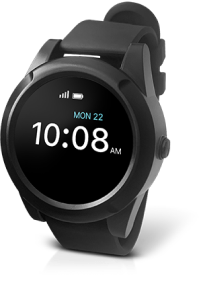


A GPS tracker for an elderly parent has two jobs: telling you where they are when you cannot reach them, and giving them a way to get help. The right one depends less on the tracker and more on your parent: will they wear a watch, will they charge it, and can they still work a phone?
We may earn a commission when you buy through links on this page. Read our affiliate disclosure.
On sale now


REOLINK Video Doorbell WiFi 2K Wired Camera
$116.99-22%Prime members
Prices from Amazon as of Nov 5, 7:15 AM ET. They can change; the price on Amazon when you buy is the one that applies. Affiliate links — we may earn a commission.
Top 4 Picks — Find Your Situation
#1 · Best Overall for Families
AngelSense WatchBest for: Families who want to check on a parent and talk to them without the parent having to manage any tech
#2 · Best With 24/7 Monitoring
Medical Guardian Mini GuardianBest for: A parent who lives alone and wants a person to answer when they press for help
#3 · Best Budget Clip-On
Tracki Mini GPS TrackerBest for: A parent who will carry a small device but refuses to wear one
#4 · Best No-Fee Option (with real limits)
Apple AirTag (2nd Generation)Best for: Finding keys, a wallet or a bag; not a safety device
Our pick for most families is the AngelSense Watch, because the family runs it from an app, it answers your call automatically, and it learns their usual places so it can tell you when something is off. A parent who already lives with a smartphone may be better served by an Apple Watch SE 3 with cellular, which adds fall detection and calls 911 directly with no monitoring fee. If what they need most is a person to answer a help button, choose a monitored device like the Medical Guardian Mini Guardian.
If memory loss is advanced, or your parent takes devices off, see our GPS trackers for dementia patients instead: that is a different problem with different answers.
A closer look at our top pick: AngelSense Watch
AngelSense Watch
Best for: Families who want to check on a parent and talk to them without the parent having to manage any tech
- Type
- GPS watch with built-in SIM
- Talk to them
- Auto-answer speakerphone
- Help button
- SOS button on the watch
- Battery
- Up to about 16 hours (company figure)
Independently researched · Updated November 2026
Most trackers assume the wearer will manage them. AngelSense assumes the family will. You set up the watch, the safe places and the alerts from your own phone, and your parent only has to wear it and leave it on the charger at night.
The two features that set it apart for an ageing parent are the auto-answer speakerphone, which means a call from you is always heard even if they cannot work a phone, and alerts built from their routine rather than a single circle around the house. You hear when they arrive somewhere, when they leave, and when they turn up somewhere new.
It costs more each month than a basic tracker, and the watch needs charging nightly. For a parent who is still independent but starting to slip, that is usually the right trade.
What we love
- Family sets everything up; the wearer does nothing
- Calls answer automatically, so you can always reach them
- Routine-learning alerts, not just a fence around the house
- Built for people with cognitive decline
Things to consider
- Needs charging every night
- One of the more expensive plans to run
- Fall detection is still in beta, according to AngelSense
Right for you if
- ✓Your parent lives alone or spends time out without you
- ✓They cannot reliably answer or use a phone
- ✓You want to know about changes in routine, not just their location
Maybe skip it if
- !Your parent will not charge a watch every night (look at the Mini Guardian or Tracki)
- !They are tech-comfortable and want a mainstream watch (look at the Apple Watch SE 3)
- !They take devices off, which needs a locking tracker: see our [dementia GPS trackers](/reviews/best-gps-trackers-for-dementia-patients)
How it compares
The Medical Guardian Mini Guardian is the better choice when the main worry is a fall or a health scare, because a trained responder answers every press, 24/7. AngelSense wins when the family wants to keep track of a parent day to day: it answers your calls by itself and alerts you to changes in routine. If your parent runs their own iPhone, an Apple Watch SE 3 with cellular is also worth a look, with fall detection and no monitoring fee.
How we picked
We compared GPS trackers for older adults on what matters to a family at a distance: real-time location away from home, a way to talk to the wearer, an SOS button, fall detection, battery life, how much the wearer has to manage, and whether a monthly plan is required. Our picks draw on manufacturer specifications and help centres, published independent reviews, and caregiver guidance, not hands-on lab testing. We do not publish prices, because plans and offers change often; check the current cost before you buy.
Reviewed by SK Kutubuddin — who researches senior-care products and the real-world needs of caregivers and older adults.
Other picks, reviewed
Medical Guardian Mini Guardian
A medical alert device first and a locator second. One press of the button connects your parent to Medical Guardian's 24/7 monitoring centre, who can see where they are and send help, and the family app shows location too. Fall detection is available as an add-on. Choose it when the bigger worry is a fall or a health scare away from home, rather than knowing where they are all day.
What we like
- A trained responder answers every press
- GPS location goes to the responder and the family app
- Small enough to wear on a lanyard or belt
- Long battery compared with a watch
Keep in mind
- Fall detection costs extra
- Easy to take off and leave at home
- Not designed for wandering or routine alerts
- Type
- GPS medical alert pendant / clip
- Talk to them
- Two-way voice with the monitoring centre
- Help button
- 24/7 monitored help button
- Battery
- Up to about 5 days (company figure)
- Monthly plan
- Monitoring plan required
Tracki Mini GPS Tracker
Read our full Tracki Mini GPS Tracker reviewA real cellular GPS tracker that costs far less to buy and run than the others here. It is small enough for a pocket, handbag or key ring, and with real-time updates the battery lasts about five days. You see where it is on the app and can set zones that alert you. It cannot make or take calls, so it locates your parent but does not let you talk to them.
What we like
- Cheapest real-time GPS option here
- Small and easy to hide in a bag or pocket
- Several days between charges
- Geofence zones with alerts
Keep in mind
- No calling or voice
- Only works if they carry it
- Still needs a data plan
- Type
- 4G clip-on GPS tracker
- Talk to them
- No
- Help button
- No voice; location only
- Battery
- About 5 days at real-time updates
- Monthly plan
- Required (low cost)
Apple AirTag (2nd Generation)
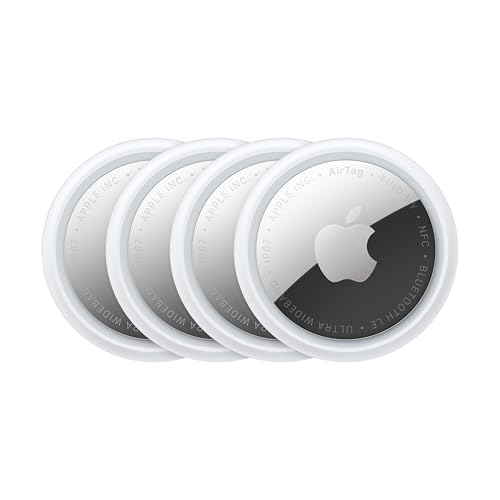
The honest answer to "GPS tracker with no monthly fee": there is no real GPS tracker without one, but an AirTag comes closest for low-risk situations. It is not GPS. It reports its position when it passes near other people's Apple devices, which works well in towns and badly in quiet areas. It has no calling, no SOS and no fall detection, and Apple makes it to find things, not people. Use it to find keys or a bag your parent keeps misplacing, never as the safety plan for someone who wanders.
What we like
- No monthly fee at all
- Tiny, light, long battery
- Very good at finding lost keys and bags
Keep in mind
- Not GPS: location depends on Apple devices nearby
- Anti-stalking alerts can warn the carrier that an AirTag is moving with them
- No calling, SOS or fall detection
- Type
- Bluetooth tag (Find My network), not GPS
- Talk to them
- No
- Help button
- No
- Battery
- Replaceable coin cell, about a year
- Monthly plan
- None
What to look for
Start with your parent, not the tracker
The best tracker is the one your parent will actually have on them. Ask three questions before comparing features:
- Will they wear a watch? If yes, a GPS watch is the most reliable form, because it is on their wrist when they leave.
- Will they charge it every night? Watches last about a day. If charging is unlikely, a clip-on with several days of battery is safer.
- Can they still use a phone? If not, choose a device that answers calls automatically, so you can always reach them.
GPS tracker, medical alert, or smartwatch?
These three overlap, but each is built around a different job:
- A family GPS tracker (AngelSense, Tracki) is for you: live location, zones and alerts on your phone.
- A medical alert device (Mini Guardian) is for them: a button that reaches a trained responder 24/7. Our medical alert smartwatches and medical alert devices cover this in depth.
- A smartwatch (Apple Watch) does a little of both, but only for someone who can manage it.
Why almost every GPS tracker has a monthly fee
A tracker that reports its location from anywhere needs its own mobile connection, and that connection costs money every month. Devices sold as having no monthly fee are usually Bluetooth tags, which only report when a phone is nearby, or devices with a year of service bundled into the price that renews afterwards.
So compare the total cost over a year or two, not the device price. A cheap device on a dear plan can cost more than an expensive one that includes service.
Features worth paying for
- Two-way voice, ideally auto-answer, so you can talk to them without them doing anything.
- An SOS button they can press without looking.
- Zone alerts that tell you when they leave home or arrive somewhere.
- Fall detection, useful but never perfect: every maker says it cannot catch every fall.
- Battery life you can live with: a day for a watch, several days for a clip-on.
Read more:Activities for Seniors With Dementia at HomeDementia AggressionDementia and Sundowning
Talk to your parent before you track them
Tracking an adult who can still make their own decisions works best with their agreement. Explain why it helps, agree on who can see their location, and let them choose the device they are most likely to wear. People who feel watched tend to leave a tracker at home.
If memory loss means your parent can no longer weigh that decision, the conversation changes, and so does the right device: see our guide to dementia wandering and our GPS trackers for dementia patients.
Frequently asked questions
For most families, the AngelSense Watch: the family sets it up and manages it, it answers calls automatically, and it alerts you to changes in routine. A tech-comfortable parent may prefer an Apple Watch SE 3 with cellular, which includes fall detection and has no monitoring fee.
Not a true one. Any tracker that reports location from anywhere needs a mobile connection, which has a monthly cost. No-fee options are Bluetooth tags such as AirTag, which only update when other Apple devices are nearby, or devices with a year of service bundled in that renews afterwards.
A watch is better if your parent will wear and charge it, because it is on their wrist when they go out. A pendant or clip-on lasts days between charges and suits someone who will not charge a watch nightly, but it is easier to leave behind.
Only as a backup. An AirTag is not GPS, has no calling or SOS, and depends on nearby Apple devices to report its position. Apple designs it to find items, not people, and its anti-stalking alerts can tell the person carrying it that an AirTag is moving with them.
Some do. The Apple Watch SE 3 includes it, Medical Guardian offers it as an add-on, and AngelSense lists it as a beta feature. No fall detection catches every fall, so it should never be the only safeguard for someone at high risk.
Yes, if they can make their own decisions. Trackers work best when the wearer agrees and helps choose the device. If dementia means they can no longer weigh the decision, involve their doctor and whoever holds power of attorney.
The final verdict
For most families keeping track of an elderly parent, the AngelSense Watch is the easiest to live with: you run it, it answers your calls, and it tells you when something changes. Choose the Apple Watch SE 3 (GPS + Cellular) for a parent who is comfortable with a smartwatch, the Medical Guardian Mini Guardian when a 24/7 responder matters most, and the Tracki Mini if your parent will carry a small device but not wear one. Keep an AirTag for keys and bags, not for safety. If memory loss is advanced, start with our GPS trackers for dementia patients.
Our overall winner is the AngelSense Watch. You can See Plans at AngelSense.
Our Top 4 Picks at a Glance
Ready to choose? Here are the top 4 again.
Best Overall for Families
AngelSense Watch
Best With 24/7 Monitoring
Medical Guardian Mini Guardian
Best Budget Clip-On
Tracki Mini GPS Tracker
Best No-Fee Option (with real limits)
Apple AirTag (2nd Generation)
Affiliate links — we may earn a commission.
More reviews
