
8 Best Smart Home Devices for Seniors
 By Kutubuddin, Founder & Senior Care Researcher Updated October 2026
In this guide
 Start HereEcho Show 8 (2025)
 Best Video DoorbellRing Battery Doorbell 2K
 Best Smart LockYale Assure Lock 2 Keypad with Wi-Fi
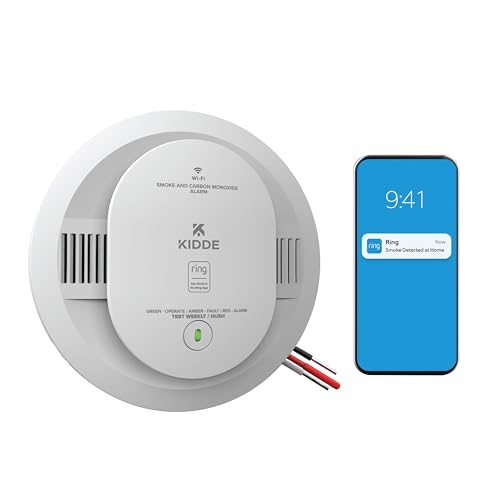 Best Smoke & CO AlarmKidde Smart Smoke + CO Alarm (Ring, Hardwired)
 Best Security SystemRing Alarm 8-Piece Kit (2nd Gen)
 Best Leak SensorRing Flood & Freeze Sensor
 Best for LampsAmazon Smart Plug
 Best Smart BulbPhilips Hue White A19 Bulb (2-Pack)
- What to look for
- Frequently asked questions
The best smart home for an older parent is a small one. Every extra app, hub and password is something that can break when you are not there, so this list is built around one rule: one screen, one voice assistant, nothing that needs its own hub.
We may earn a commission when you buy through links on this page. Read our affiliate disclosure.
Top 8 Picks — Find Your Situation
#1 · Start Here
Echo Show 8 (2025)Best for: Every home on this list — it is the control point for the rest
#2 · Best Video Doorbell
Ring Battery Doorbell 2KBest for: A parent who is slow to the door or wary of strangers
#3 · Best Smart Lock
Yale Assure Lock 2 Keypad with Wi-FiBest for: A parent who loses keys, or family who want to know the door is locked
#4 · Best Smoke & CO Alarm
Kidde Smart Smoke + CO Alarm (Ring, Hardwired)Best for: A parent who lives alone, or anyone who might not hear or react to a beeping alarm
#5 · Best Security System
Ring Alarm 8-Piece Kit (2nd Gen)Best for: A parent who feels unsafe at home, or family who want peace of mind about the doors
#6 · Best Leak Sensor
Ring Flood & Freeze SensorBest for: Under the kitchen sink, behind the toilet, or next to the water heater
#7 · Best for Lamps
Amazon Smart PlugBest for: A lamp that is hard to reach, or lights that should come on by themselves at dusk
#8 · Best Smart Bulb
Philips Hue White A19 Bulb (2-Pack)Best for: Hallway, stairs and bathroom lights used at night
That screen is an Echo Show. Your parent can call family by voice, see who is at the door, and turn on a lamp without getting up — and you can manage most of it from your own phone.
Add devices for the problems your parent actually has, not because they are clever. A video doorbell for a parent who struggles to the door, a keypad lock for one who loses keys, a smart smoke and CO alarm that also tells you, and a leak sensor under the sink. For falls, wandering and medication, we have dedicated guides, linked below.
Why the whole setup starts with an Echo Show
Echo Show 8 (2025)
Best for: Every home on this list — it is the control point for the rest
- Solves
- Calls, check-ins, voice control
- Subscription
- Not needed
- Hub needed
- No — it is the hub
Independently researched · Updated October 2026
Most smart home advice for seniors is a shopping list. The problem is that every device arrives with its own app, account and settings, and an older person ends up with five things they cannot fix. Building around one Echo Show avoids that: it is the one screen, the one voice and the one app everything here reports to.
It also gives your parent something genuinely useful on day one — voice calls to family, the time and weather, reminders — so the smart home is not a set of gadgets they put up with for your sake.
Add the rest one at a time, a week or two apart, so each new thing becomes familiar before the next arrives.
What we love
- Voice calling and Drop In for family
- Shows the doorbell camera when someone rings
- Controls the lights and plugs below by voice
Things to consider
- Shows ads that cannot be switched off completely
- Not an emergency device on its own
- No sliding camera cover on this model
Right for you if
- ✓Your parent is comfortable talking to a device, or willing to try.
- ✓There is reliable Wi-Fi — most of these need the 2.4 GHz band.
- ✓Someone in the family can set things up and manage the apps.
Maybe skip it if
- !The main worry is falls or a medical emergency. Start with a [medical alert system](/reviews/best-medical-alert-devices-for-seniors) — smart home devices do not call for help.
- !There is no internet in the home. Almost everything here stops working without it.
- !Your parent does not want any of it. Change made against someone’s wishes rarely sticks; start with the one device they would value most.
Getting started
- →Do the setup yourself, on one Amazon account, before or during one visit.
- →Check the router: these devices need 2.4 GHz Wi-Fi, and some routers hide it.
- →Name devices plainly in the Alexa app (“bedroom lamp”, “front door”) so the voice commands are obvious.
- →Write the five commands they will actually use on a card next to the Echo Show.
How we picked
We compared 8 options. We do not own or test these devices, and this page makes no claim to hands-on testing. We chose one product per problem, favoring established brands, devices that need no separate hub, and those that work with Amazon Alexa so the whole home answers to one voice assistant. Specifications and subscription details come from the manufacturers’ own pages, checked in October 2026; features and plans change, so confirm before buying.
Reviewed by Kutubuddin — who researches senior-care products and the real-world needs of caregivers and older adults.
Other picks, reviewed
Ring Battery Doorbell 2K
Answering the door is a real fall risk for someone unsteady on their feet. With this doorbell, a press can show the visitor on the Echo Show for a few seconds, so your parent can see who it is — and talk to them — before deciding to get up. It records head to toe, which helps spot a parcel on the step. It runs on a built-in rechargeable battery and can top up from existing doorbell wiring. Live view and two-way talk work without a subscription; saving recordings needs a Ring plan.
What we like
- Visitor appears on the Echo Show when the bell is pressed
- Head-to-toe view shows parcels on the step
- Live view and talk work with no plan
- Can use existing doorbell wires to stay charged
Keep in mind
- Recordings need a paid Ring plan
- Indoor chime sold separately
- 2.4 GHz Wi-Fi only
- Turn on doorbell notifications in the Alexa app, or it will not show on the Echo
- Solves
- Seeing who is at the door
- Subscription
- Only to save recordings
- Hub needed
- No
Yale Assure Lock 2 Keypad with Wi-Fi
The fix for lost keys and the late-night worry about whether the door is locked. It has real, backlit push buttons rather than a touchscreen, which are easier for stiff or shaky fingers, and it locks itself once the door is closed. Wi-Fi is built in, so there is no hub. You can give a caregiver or neighbor their own code and see when it is used, and a physical key still works as a backup. Locking by voice is easy; unlocking by voice is off by default and needs a spoken PIN.
What we like
- Physical backlit buttons, not a touchscreen
- Locks itself when the door closes
- Separate codes for carers and family
- Backup key still works
Keep in mind
- Battery life varies a lot — some owners change batteries monthly, so check the app
- Setup is a screwdriver job on an existing deadbolt hole
- 2.4 GHz Wi-Fi only
- Solves
- Lost keys, unlocked doors
- Subscription
- Not needed
- Hub needed
- No (Wi-Fi built in)
Kidde Smart Smoke + CO Alarm (Ring, Hardwired)
A smoke alarm only helps if someone acts on it. This one speaks the danger out loud — “Fire!” or “Warning, carbon monoxide” — which is clearer than a beep for someone hard of hearing or confused, and it sends an alert to family phones through the Ring app, free. One unit can also report for the other Kidde hardwired alarms in the house. It replaces a hardwired alarm and keeps a battery backup; if there is no hardwired alarm, Kidde sells a battery-only version.
What we like
- Spoken alerts, not just a beep
- Phone alerts to family through the Ring app
- Covers other Kidde hardwired alarms in the home
- Battery backup
Keep in mind
- Replacing another brand’s hardwired alarm means rewiring the plug — a job for an electrician
- Phone alerts stop if the mains power is out
- Do not count on Echo announcements; alerts come through the Ring app
- Solves
- Fire and carbon monoxide
- Subscription
- Not needed (24/7 monitoring optional)
- Hub needed
- No
Ring Alarm 8-Piece Kit (2nd Gen)
For a parent who feels unsafe at home, or for family who want to know the doors are shut at night. The kit covers four doors or windows and one room with motion, and the base station keeps working for up to a day if the power fails. Phone alerts are free. Professional 24/7 monitoring — and arming or disarming by voice through Alexa — need a Ring plan. The same sensors can quietly show family that a parent is up and about, without a camera.
What we like
- Easy stick-on sensors, no drilling
- Base station has battery backup
- Optional professional monitoring
- Shows activity without cameras
Keep in mind
- Voice arm/disarm and monitoring need a paid plan
- A keypad and codes to learn
- Another app for the family to manage
- Solves
- Security and door activity
- Subscription
- For pro monitoring and voice control
- Hub needed
- Included (base station)
Ring Flood & Freeze Sensor
A leak under the sink or a burst pipe can go unnoticed for days when someone lives alone, and mopping up is a fall risk in itself. This small sensor sends a phone alert when it detects water, and another if the room drops toward freezing. It connects through Amazon Sidewalk via nearby Echo or Ring devices, so it needs no base station of its own, and runs for years on batteries.
What we like
- Leak and low-temperature alerts
- No base station needed
- Long battery life
Keep in mind
- No siren — alerts go to phones only
- Needs an Echo or Ring device within range for Sidewalk
- Some owners report it dropping offline; test it after setup
- Solves
- Leaks and freezing pipes
- Subscription
- Not needed
- Hub needed
- No (uses an Echo nearby)
Amazon Smart Plug
The cheapest change with the biggest effect. Plug a bedside or living-room lamp into it and your parent can say “Alexa, turn on the lamp” instead of reaching for a switch in the dark, or have it come on at dusk every day. It is set up entirely in the Alexa app, with no hub and no second app.
What we like
- Set up in the Alexa app only
- Voice control and schedules
- Inexpensive
Keep in mind
- Works with Alexa only
- No energy monitoring
- Only switches the plugged-in device on or off
- Solves
- Reaching switches in the dark
- Subscription
- Not needed
- Hub needed
- No
Philips Hue White A19 Bulb (2-Pack)
For ceiling lights and fixtures a smart plug cannot reach. These soft warm-white bulbs pair straight to an Echo Show over Bluetooth, with no Hue Bridge, so the hallway or bathroom light can come on by voice or on a schedule. Leave the wall switch on, or the bulb cannot be controlled — a sticker over the switch helps.
What we like
- No hub needed with an Echo Show
- Warm, comfortable light
- From the best-known smart bulb brand
Keep in mind
- The wall switch must stay on
- Without a Hue Bridge, control works only at home
- Up to 10 bulbs per Echo
- Solves
- Dark hallways and ceiling lights
- Subscription
- Not needed
- Hub needed
- No (pairs to an Echo)
What to look for
Start with the problem, not the gadget
Match each device to something that actually worries you or your parent. Several common problems are better solved by products we cover in their own guides:
- Falls, or needing help fast — medical alert systems, medical alert smartwatches, or ambient fall detection sensors.
- Night-time trips to the bathroom — motion-sensor night lights and bed alarms.
- Wandering with dementia — door alarms and GPS trackers.
- Missed or doubled medication — automatic pill dispensers.
- Checking in from far away — cameras, daily check-in services and home monitoring systems.
- Staying in touch — video calling devices.
Pick one assistant and stay with it
Everything on this page works with Amazon Alexa, and most of it needs no hub. Mixing Alexa, Google and Apple devices in the same home means more apps, more accounts and more things that do not talk to each other — exactly what an older person does not need. If your parent already uses an iPhone and Siri, or a Google Nest Hub, choose devices for that system instead and stick to it.
Check the Wi-Fi first
Nearly every device here connects to 2.4 GHz Wi-Fi only. Many newer routers combine 2.4 and 5 GHz under one name, which usually works, but some setups fail until the 2.4 GHz band is available on its own. Check the router before you start, and make sure the signal reaches the front door and the kitchen sink.
Subscriptions: what is free and what is not
- Free: calling and Drop In on the Echo Show, doorbell live view and talk, phone alerts from the smoke alarm, leak sensor and security sensors, the lock, plug and bulbs.
- Paid, optional: saving doorbell recordings, professional 24/7 security or smoke monitoring, voice arming of the security system, Alexa+ without Prime, and Amazon’s Emergency Assist.
Start with the free version of everything and add a plan only if you find you need it.
Read more:Activities for Seniors With Dementia at HomeDementia AggressionDementia and Sundowning
Ask before you install
A smart home can feel like surveillance to the person living in it. Talk through each device before it goes in: what it does, who sees the alerts, and how to switch it off. Cameras and Drop In especially should be agreed, not imposed. A parent who understands why the doorbell shows up on the Echo is far more likely to use it than one who found it installed.
What a smart home cannot do
None of these devices calls for help on its own. A smart smoke alarm alerts phones, but someone has to act on it; an Echo Show cannot dial 911. For a parent who lives alone and could fall, a medical alert system comes first, and the smart home is the layer around it.
Frequently asked questions
Start with an Echo Show for voice calling and control, then add only what solves a real problem: a video doorbell, a keypad smart lock, a smart smoke and CO alarm, a water leak sensor, and smart plugs or bulbs for lighting. Keep everything on one voice assistant so there is one app to manage.
Mostly not. The devices on this page all work without one for their core job. Subscriptions are optional extras: saving doorbell video, professional security or smoke monitoring, voice arming of the alarm, and Amazon’s Emergency Assist.
Yes, for everyday safety and connection: seeing who is at the door, never losing keys, alerts to family if the smoke alarm sounds or a pipe leaks, and lights that come on by voice. It does not replace a medical alert device, which is what gets help after a fall.
For many, yes. Voice control removes buttons and apps, and an Echo Show adds video calls and Drop In check-ins. The drawbacks are on-screen ads, the need for Wi-Fi, and that Alexa cannot call 911. See our guide to the best Echo Show for seniors.
Not for anything on this page. The Echo Show acts as the control point, the lock and doorbell connect to Wi-Fi directly, the leak sensor uses Amazon Sidewalk, and the bulbs pair to the Echo over Bluetooth. Only the Ring Alarm has its own base station, which comes in the kit.
The final verdict
Start with an Echo Show 8 and add only what solves a real problem: a Ring Battery Doorbell 2K if getting to the door is hard, a Yale keypad lock if keys go missing, a Kidde smart smoke and CO alarm so family hear about a fire, and a Ring leak sensor under the sink. A smart plug and a couple of smart bulbs make the dark hours safer for very little. Keep it to one assistant and one app, set it up yourself, and remember that none of it replaces a medical alert system for someone at risk of falls.
Our overall winner is the Echo Show 8 (2025). You can check the current price on Amazon.
Our Top 5 Picks at a Glance
Ready to choose? Here are the top 5 again.
Start Here
Echo Show 8 (2025)
Best Video Doorbell
Ring Battery Doorbell 2K
Best Smart Lock
Yale Assure Lock 2 Keypad with Wi-Fi
Best Smoke & CO Alarm
Kidde Smart Smoke + CO Alarm (Ring, Hardwired)
Best Security System
Ring Alarm 8-Piece Kit (2nd Gen)
Affiliate links — we may earn a commission.
