
5 Best Medical Alert Devices for Seniors
 By Kutubuddin, Founder & Senior Care Researcher Updated October 2026
In this guide
 Best OverallMedical Alert Pendant for Seniors (Direct-to-Family, No Call Center)
 Best for In-Home MonitoringWiFi In-Home Medical Alert System with Fall Detection & Virtual Caregiver
 Best Caregiver PagerWireless Caregiver Pager (1 Button + 1 Receiver)
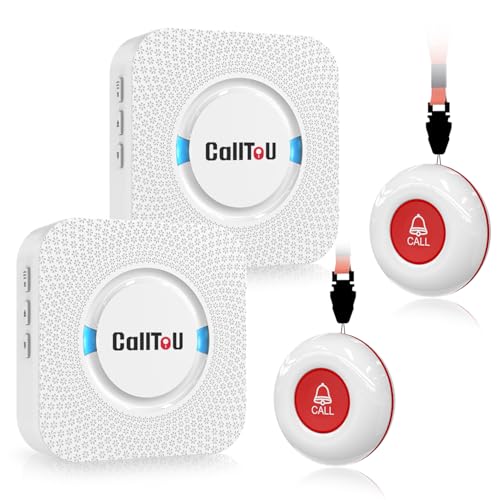 Best for Multiple RoomsCallToU Wireless Caregiver Pager (2 Buttons, 2 Receivers, 500+ ft)
 Best for Early-Rise WarningLunderg Wireless Early Alert Bed Alarm System
- What to look for
- Frequently asked questions
A medical alert device buys one thing that matters enormously: fast help when a senior has fallen or can't reach a phone — a real risk, since about one in four older adults falls each year.
We may earn a commission when you buy through links on this page. Read our affiliate disclosure.
Top 5 Picks — Find Your Situation
#1 · Best Overall
Medical Alert Pendant for Seniors (Direct-to-Family, No Call Center)Best for: Seniors whose family wants alerts sent directly to them — with fall detection, GPS, and two-way calling but no monthly fee
#2 · Best for In-Home Monitoring
WiFi In-Home Medical Alert System with Fall Detection & Virtual CaregiverBest for: Seniors who are mostly at home and want WiFi-based monitoring with fall detection and a risk-free trial period
#3 · Best Caregiver Pager
Wireless Caregiver Pager (1 Button + 1 Receiver)Best for: Caregivers at home or nearby who want a senior to be able to call them instantly with one button
#4 · Best for Multiple Rooms
CallToU Wireless Caregiver Pager (2 Buttons, 2 Receivers, 500+ ft)Best for: Households where the caregiver moves between rooms or floors and wants call buttons in more than one spot
#5 · Best for Early-Rise Warning
Lunderg Wireless Early Alert Bed Alarm SystemBest for: Caregivers of seniors at high fall risk — especially with dementia — who need an early warning before the person stands up
These devices take a different path from the big subscription brands: instead of routing every alert through a paid call centre, they get help to the people already in the senior's life. Our overall pick is a Medical Alert Pendant that sends alerts straight to family, with automatic fall detection, GPS and two-way calling, no monthly contract. Below it: a WiFi in-home system, two caregiver pagers, and an early-alert bed alarm. Whatever you choose, check the battery life — a pendant you must recharge nightly is easy to forget.
A closer look at our top pick: the direct-to-family medical alert pendant
Medical Alert Pendant for Seniors (Direct-to-Family, No Call Center)
Best for: Seniors whose family wants alerts sent directly to them — with fall detection, GPS, and two-way calling but no monthly fee
- Response
- Direct to family (no call center)
- Fall detection
- Automatic
- Location
- GPS tracking
- Calling
- Two-way audio
Independently researched · Updated October 2026
This pendant wins by combining the three features that matter most in a medical alert — automatic fall detection, GPS location, and two-way calling — and then removing the part families most resent: the monthly call-center bill. When the wearer falls, it can place the call on its own; when they just need a hand, one press opens two-way audio. The alert goes to the people who already know the senior best.
It's also built for the place falls actually happen. Because it's a waterproof necklace, it stays on in the shower and bath instead of being left on a nightstand. For a family ready to be the responder, that combination — full feature set, no contract, worn where it counts — is hard to beat.
What we love
- Fall detection, GPS, and two-way calling in one pendant
- Alerts family directly — no monthly call-center fee
- No long-term contract
- Waterproof for bathroom and shower use
Things to consider
- Relies on family being reachable and able to respond — no 24/7 professional center
- GPS and calling depend on a network signal; confirm any SIM or data requirement on the listing
- Family members must be set up as emergency contacts first
Right for you if
- ✓You have family who are reachable and want alerts sent straight to them
- ✓You want fall detection, GPS, and two-way calling without a monthly call-center fee
- ✓You want a device the senior will actually keep on, including in the shower
- ✓You'd rather make a one-time purchase than sign a monitoring contract
Maybe skip it if
- !The senior lives alone with no one nearby to respond — consider a monitored service or the WiFi system
- !You want professional 24/7 agents managing every call — that's a subscription service, not this
- !You only need a simple in-home call button — a caregiver pager costs less and is simpler
What owners consistently report
Common praise
- +Families value alerts coming straight to them with no monthly fee
- +The all-in-one pendant (fall detection + GPS + talk) is seen as good value
- +Being waterproof means it's actually worn in the bathroom
Common gripes
- –It depends on family being available to answer — there's no backup call center
- –GPS and calling rely on a network signal; confirm any SIM or data requirement
- –Contacts and settings need to be configured correctly before it can help
Getting started
- →Add and test family emergency contacts before relying on the pendant
- →Confirm on the listing whether a SIM or data plan is needed for GPS and calling
- →Have the senior practice a test alert so the button and audio feel familiar
How it compares
The WiFi in-home system is the closest alternative when family can't always be the responder: it adds customizable fall alerts and a virtual-caregiver check-in over home WiFi, with a 60-day trial. The trade-off is an ongoing monthly subscription and in-home-only coverage. The pendant wins for families who want mobile coverage and no recurring fee; the WiFi system wins when the senior is almost always home and you want monitoring-style features with a safety net to test first.
MedicAlert Foundation Membership + Medical ID
Every product on this page summons help. A medical ID works in the other direction — it tells whoever arrives what they need to know. If someone is found after a fall, a stroke or a seizure and cannot speak for themselves, the responder has no history, no medication list, and no way to reach family. An engraved ID and the record service behind it close that gap. It is a genuinely different problem, and it is the one nothing on this page otherwise answers.
Affiliate link. If you sign up through it we may earn a commission at no extra cost to you. It is here because a medical ID answers a question none of our picks address, not because of the commission — and we have said plainly above what it does not do.
How we picked
We compared medical alert and caregiver-alert devices that are actually sold on Amazon on what matters in an emergency: how the alert reaches help (direct to family, a caregiver pager, or a WiFi monitoring app), whether fall detection or early-rise warning is included, in-home range and coverage, ease of setup, and whether a subscription is required. Our notes draw on manufacturer descriptions, Amazon listings and customer feedback — not hands-on lab testing. Many of the big professionally-monitored brands (Bay Alarm Medical, MobileHelp, Medical Guardian) are sold direct by the provider rather than on Amazon, so this list focuses on the strongest devices a family can order today and set up themselves.
Reviewed by Kutubuddin — who researches senior-care products and the real-world needs of caregivers and older adults.
Other picks, reviewed
WiFi In-Home Medical Alert System with Fall Detection & Virtual Caregiver
An in-home safety system that runs on your home WiFi rather than a landline, pairing an emergency call button with customizable fall alerts and a 'virtual caregiver' feature for check-ins. It uses a monthly subscription, but starts with a 60-day trial — long enough for a family to confirm it fits the home and the senior's routine before committing. For someone who's mostly home and wants monitoring-style coverage without a phone line, it's the natural step up from a single button.
What we like
- Uses home WiFi, no phone line required
- Customizable fall alerts
- Virtual caregiver feature for family peace of mind
- 60-day trial to test it risk-free
Keep in mind
- Requires a reliable home WiFi connection
- Ongoing monthly subscription after the trial
- In-home coverage only — not for trips outside the house
Key features
- Works over home WiFi — no landline needed
- Customizable fall alerts
- Emergency call button
- Virtual caregiver check-in feature
- 60-day trial before commitment
- Connection
- Home WiFi (no landline)
- Fall detection
- Custom fall alert
- Button
- Emergency call button
- Extra
- Virtual caregiver check-ins
- Trial
- 60-day
- Cost
- Monthly subscription
Wireless Caregiver Pager (1 Button + 1 Receiver)
When the caregiver is already in the home or close by, a wireless call-button pager is the simplest and most affordable way for a senior to summon them — press the SOS button and the receiver chimes wherever the caregiver is. It needs no subscription, no wiring, and no phone. Put a button by the bed or chair, plug the receiver in near the caregiver, and it just works.
What we like
- IP55 water- and dust-resistant call button
- Instant one-button SOS to the caregiver
- No monthly fee or installation
- Portable buttons for bed, chair, or bathroom
Keep in mind
- Only works within wireless range of the receiver
- Alerts the caregiver — not 911 or a monitoring center
- No fall detection or GPS
Key features
- One-button SOS call to the caregiver
- Plug-in receiver chimes anywhere in range
- No subscription, wiring, or phone needed
- Portable, lightweight call buttons
- Up to 1500 ft range between button and receiver
- Type
- Wireless call button + receiver/pager
- Alert
- SOS chime to the caregiver
- Install
- Plug-in, no wiring
- Subscription
- None
CallToU Wireless Caregiver Pager (2 Buttons, 2 Receivers, 500+ ft)
The CallToU system ships with two SOS call buttons and two plug-in receivers and carries over 500 feet, so you can place a button by the bed and another in the bathroom while putting receivers in different rooms — meaning the caregiver hears the call whether they're in the kitchen or upstairs. It's the pick when one button and one receiver aren't enough to cover the way a household actually moves around.
What we like
- Two buttons and two receivers cover multiple rooms
- 500+ ft range for larger homes
- Plug-in receivers, no wiring
- No monthly fee
Keep in mind
- Wireless range is reduced by walls and floors
- Alerts the caregiver only — no 911 or center
- No fall detection or GPS
Key features
- Two SOS buttons cover bed and bathroom
- Two plug-in receivers for different rooms
- 500+ ft wireless range
- No wiring or subscription
- Multiple chime tones and volume levels
- Buttons
- 2 SOS transmitters
- Receivers
- 2 plug-in
- Range
- 500+ ft
- Install
- Plug-in, no wiring
- Subscription
- None
Lunderg Wireless Early Alert Bed Alarm System
Instead of waiting for a fall, this system warns the caregiver the moment a senior starts to get up. An under-mattress sensor pad triggers a wireless pager carried by the caregiver — and crucially, there's no loud alarm in the room itself, which avoids startling or agitating someone with dementia. It's designed for the highest-risk moments: getting out of bed at night, unassisted.
What we like
- Warns before the person gets up, not after a fall
- No frightening in-room alarm — suited to dementia care
- Wireless pager so the caregiver gets the alert anywhere in range
Keep in mind
- Can give a caregiver early warning before the person gets up — someone must be able to respond
- Sensor pad must be positioned correctly under the mattress
- Not an emergency-calling device on its own
Key features
- Warns the caregiver before the person gets up
- No startling in-room alarm — good for dementia
- Under-mattress sensor pad
- Wireless pager for the caregiver
- Type
- Under-mattress sensor + wireless pager
- Alert
- Pager only (no in-room alarm)
- Purpose
- Early-rise warning
- Focus
- Fall prevention / dementia care
What to look for
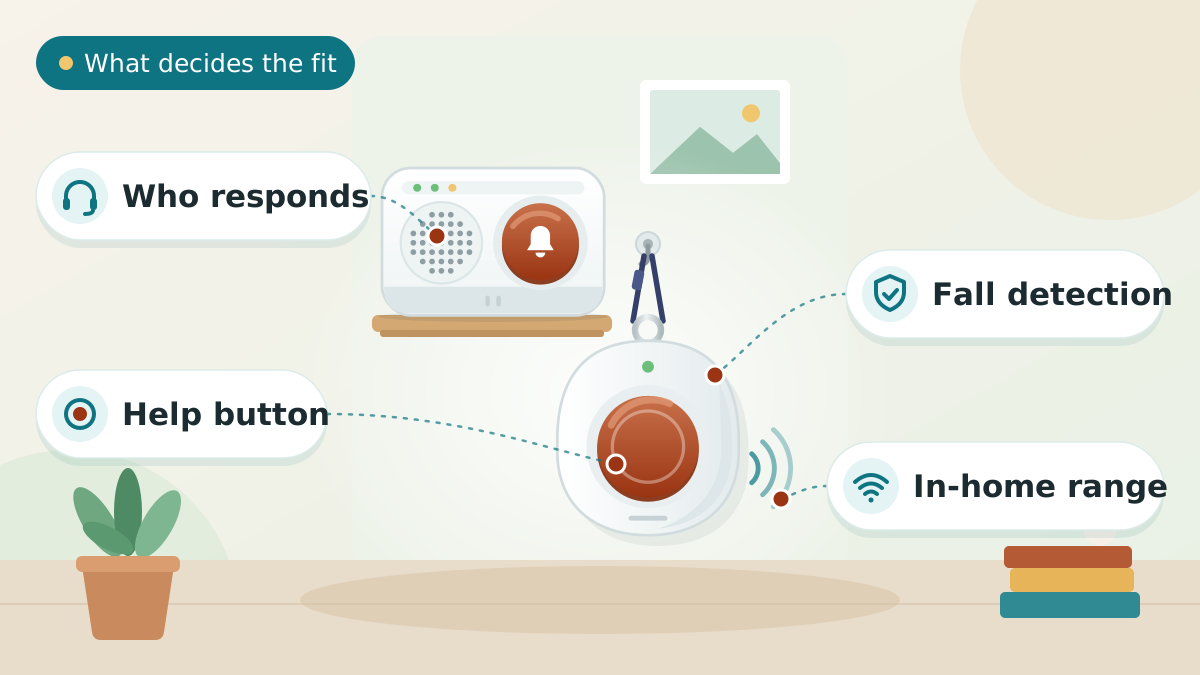
Three kinds of alert device — and which one fits
These devices solve the same problem in different ways. Match the device to who will actually respond.
- Direct-to-family pendant: fall detection, GPS, and two-way calling that alert the senior's own family rather than a call center. Best when family is reachable and wants to be the first responder, with no monthly fee.
- WiFi home system: an in-home button with fall alerts and check-ins over your home WiFi, on a monthly subscription. Best for someone mostly at home who wants monitoring-style coverage without a landline.
- Caregiver pager or bed alarm: a wireless button (or under-mattress sensor) that chimes a pager carried by a caregiver who's in or near the home. Best when there's a caregiver on hand and you want the simplest, no-fee way to call them.
If the senior lives truly alone with no one nearby to respond, a professionally-monitored subscription service (sold direct by brands like Bay Alarm Medical or Medical Guardian) is still worth considering alongside these.
Fall detection vs. early-warning: two ways to handle a fall
About one in four older adults falls each year, according to the CDC, and a fall is exactly when someone may be unable to press a button. There are two strategies here.
- Automatic fall detection (the pendant and the WiFi system) senses the motion of a fall and triggers an alert on its own, after the fact.
- Early-warning (the Lunderg bed alarm) tries to prevent the fall — it tells the caregiver the person is getting up so they can be there to help before anything happens.
For someone whose falls happen getting out of bed at night, an early-warning approach may suit their needs alongside or instead of a post-fall alert. The two can also work together.
Range and coverage: in-home vs. on-the-go
Caregiver pagers and the bed alarm work only within wireless range of their receiver — fine for a single home, but walls and floors cut the distance, so check the rated range against the size of the house. The CallToU's two receivers help by covering more than one room.
Only the direct-to-family pendant is built to work beyond the home, using GPS and a cellular signal so a fall on a walk or at the store can still get help. If the senior leaves the house on their own, that mobile coverage is the feature that matters most.
Subscription or one-time cost
Budget for the whole picture, not just the sticker price.
- No monthly fee: the caregiver pagers and the bed alarm are one-time purchases with nothing ongoing. The direct-to-family pendant has no call-center contract — though you should confirm on the listing whether GPS and cellular calling need a SIM or data plan.
- Subscription: the WiFi home system runs on a monthly plan after its 60-day trial.
- Coverage help: traditional Medicare generally doesn't pay for alert devices, but some Medicare Advantage plans, Medicaid waivers, or the VA might — check your specific plan.
Tips to Choose Medical Alert Devices
Short on time? Here are the key points to weigh before choosing, each covered in detail above:
- Three kinds of alert device — and which one fits
- Fall detection vs. early-warning: two ways to handle a fall
- Range and coverage: in-home vs. on-the-go
- Subscription or one-time cost
Comparing options? See our guides to Best Ai Ambient Fall Detection Sensors, Best Bedside Fall Mats, and Best Dementia Clocks.
How to set it up so it actually protects
A device only helps if it's worn, placed, and tested:
- For the pendant: add family as emergency contacts first, and have the senior wear it in the shower and bath, where many falls happen.
- For pagers: keep a button within easy reach of the bed and chair, and make sure the caregiver keeps the receiver with them or plugged in where they'll hear it.
- For the bed alarm: position the sensor pad per the instructions so it reliably senses the person leaving the bed.
- Test every device monthly so the senior is comfortable using it and you know the batteries and signal are good.
- Charge anything battery-powered on a regular routine so it's never dead when it's needed.
When a help button isn't the whole answer
An alert device handles the moment of need, but it doesn't prevent every fall or manage wandering. Pair it with the rest of a home-safety plan.
For someone with dementia who may leave the home, add a GPS tracker and door alarms. For broader peace of mind, an elderly monitoring system adds sensors and caregiver alerts beyond a single button, and bed alarms cover the high-risk moment of getting up at night.
Frequently asked questions
It's a device that summons help in an emergency — a wearable help button or pendant, a caregiver call-button pager, or a bed sensor. The senior presses it (or, with fall detection, it triggers automatically), and it alerts either family, a caregiver's pager, or a monitoring app. The point is to get help fast even if the person has fallen and can't reach a phone.
Two of them do. The direct-to-family pendant and the WiFi home system both include automatic fall detection, which senses the sudden motion of a fall and triggers an alert even if the person can't press the button. The caregiver pagers are press-button only. The Lunderg bed alarm takes a different approach — it warns the caregiver before the person gets up, aiming to prevent the fall rather than report it.
Not most of these. The two caregiver pagers and the bed alarm are one-time purchases with no ongoing fee, and the direct-to-family pendant has no call-center contract (confirm on the listing whether GPS and cellular calling need a SIM or data plan). Only the WiFi in-home system uses a monthly subscription, and it starts with a 60-day trial. This is the main way these differ from big monitored brands, which charge an ongoing monthly fee.
A medical alert like the pendant is designed to reach help even when no one is around — it can call family, share GPS location, and work outside the home. A caregiver pager is for when someone is already in or near the house: pressing the button chimes a receiver the caregiver carries, so they come help. Pagers are simpler and have no monthly fee, but they only work within wireless range and don't contact 911 or a monitoring center.
Within its rated wireless range, yes — but walls and floors reduce the distance, so check the range against the size of your home. The CallToU set helps by including two receivers you can place in different rooms or on different floors, so the caregiver hears the call wherever they are. For a single floor or smaller home, one button and one receiver are usually enough.
The medical alert pendant is a waterproof necklace, which matters because a large share of falls happen in the bathroom — so it should be worn in the shower. The caregiver call buttons are typically water-resistant rather than fully waterproof, and the bed alarm's sensor stays under the mattress, so check each listing's rating before getting any part wet.
The Lunderg bed alarm is built for it: it warns the caregiver the moment the person starts to get up, and deliberately has no loud in-room alarm that could frighten or agitate someone with dementia. Pair it with door alarms and a GPS tracker if wandering is a concern. A wearable pendant can help too, but only if the person will reliably keep it on.
Nothing bad. With a caregiver pager, the caregiver simply comes to check and the senior tells them it was a false alarm — far better than hesitating in a real emergency. With the direct-to-family pendant, you tell the family member who answers. Encourage seniors never to hesitate: a false alarm is always better than not pressing when help is needed.
Traditional Medicare (Parts A and B) generally doesn't cover medical alert or caregiver-alert devices, treating them as personal-comfort items. Some Medicare Advantage (Part C) plans offer partial coverage, and Medicaid waivers or the VA may help in certain cases. The good news with most of the devices here is that there's no monthly fee to cover in the first place — they're a one-time purchase.
It depends on the device. The direct-to-family pendant is designed to alert family directly, and the WiFi home system includes a virtual-caregiver check-in feature. The caregiver pagers and bed alarm alert a physical receiver/pager in the home rather than a phone, which is simpler and needs no app — but means the responder has to be within range.
The final verdict
For most families, the direct-to-family Medical Alert Pendant is the best all-round choice — fall detection, GPS, and two-way calling in a waterproof necklace, with alerts going straight to family and no monthly contract. Step up to the WiFi in-home system if family can't always respond and you want monitoring-style fall alerts with a 60-day trial. If a caregiver is already on hand, a wireless pager is the simplest, cheapest way for a senior to call them — a simple caregiver pager for a single area, or the CallToU two-button, two-receiver set for a larger home. And for the highest-risk moment of all — getting out of bed at night — the Lunderg early-alert bed alarm warns the caregiver before a fall instead of after. The real decision isn't the gadget; it's who will respond, and whether they're in the house or across town. Four of the five picks work with no monthly fee; only the WiFi in-home system uses a subscription after its 60-day trial. Every pick above sends its alert to family rather than to a call centre, which is the right trade when someone reliably answers. If nobody is guaranteed to pick up at 4am, that gap is what a monitored subscription exists to close — see choosing a medical alert system for what monitoring costs and who genuinely needs it.
Our overall winner is the Medical Alert Pendant for Seniors (Direct-to-Family, No Call Center). You can check the current price on Amazon.
Our Top 5 Picks at a Glance
Ready to choose? Here are the top 5 again.
Best Overall
Medical Alert Pendant for Seniors (Direct-to-Family, No Call Center)
Best for In-Home Monitoring
WiFi In-Home Medical Alert System with Fall Detection & Virtual Caregiver
Best Caregiver Pager
Wireless Caregiver Pager (1 Button + 1 Receiver)
Best for Multiple Rooms
CallToU Wireless Caregiver Pager (2 Buttons, 2 Receivers, 500+ ft)
Best for Early-Rise Warning
Lunderg Wireless Early Alert Bed Alarm System
Affiliate links — we may earn a commission.
