
6 Best Elderly Monitoring Systems for Seniors
 By Kutubuddin, Founder & Senior Care Researcher Updated October 2026
In this guide
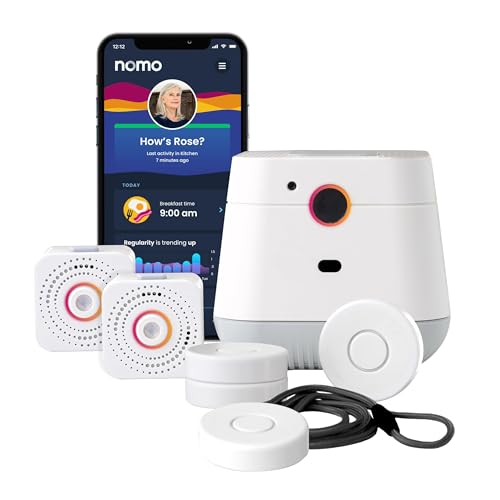 Our pickNOMO Smart Care Medical Alert System
 Best wearableApple Watch SE 3 with Fall Detection
 Best on-the-go alertMedical Guardian MGMini
 Best DIY home sensorsRing Alarm 8-Piece Kit
 Best if you want a cameraCallToU No-WiFi Elderly Monitor with Camera & Call Button
 Best for living aloneAmazon Echo Hub — Smart Home Control Panel with Alexa+
- What to look for
- Frequently asked questions
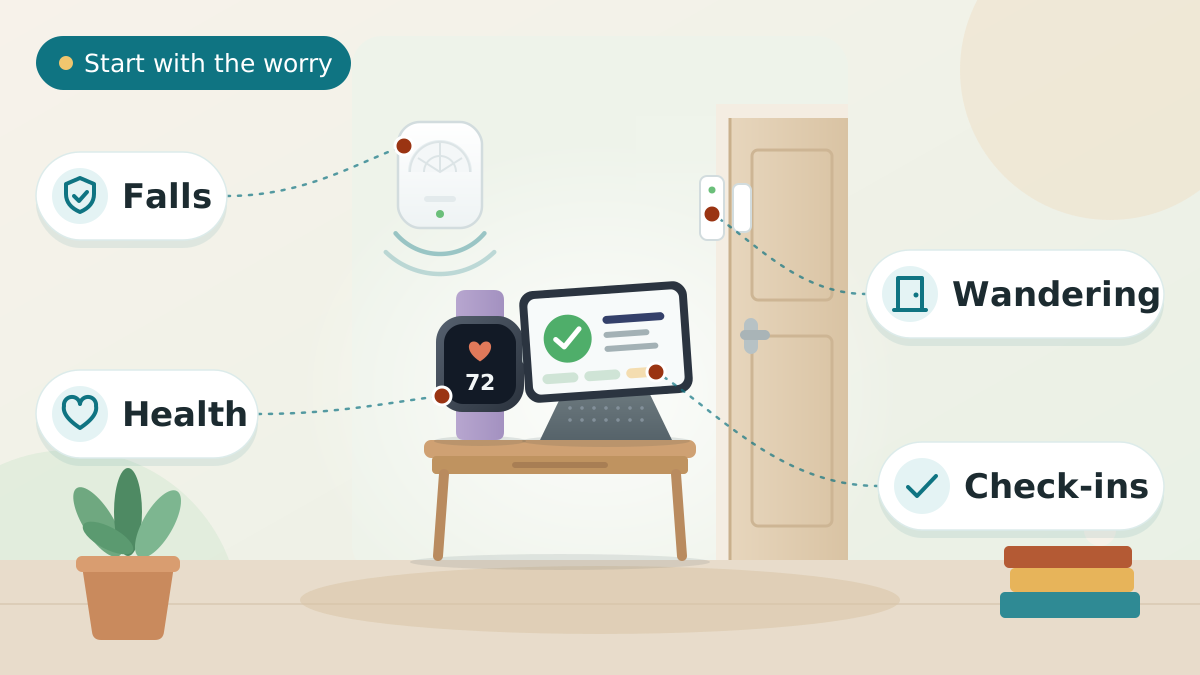
A good senior monitoring system answers one question for a worried family: “Is Mom okay right now?” — without turning her home into a surveillance set. These systems come in four types: camera-free sensors, wearables, medical alerts, and smart-home hubs. Our top pick for most families is a sensor-based, camera-free fall-detection system — it protects a parent in the bathroom and bedroom without a pendant or a camera.
The right choice still depends on whether your biggest worry is falls, health, wandering, or daily check-ins. For most families the real goal is peace of mind: a parent living independently, with help on the way the moment something goes wrong. Below, how the main options compare.
We may earn a commission when you buy through links on this page. Read our affiliate disclosure.
Our Top Pick
NOMO Smart Care Medical Alert System
If your parent refuses to wear a pendant, this is the system to start with.
- Detects falls without a wearable or a camera
- Protects dignity in private rooms
- Sends automatic alerts — nothing to press
Type
Sensor-based alert
Monitoring
Camera-free
Best for
Privacy + falls
Top 6 Picks — Find Your Situation
Best forParents who won’t wear a pendant and value privacy at home
- Detects falls without a wearable or a camera
- Protects dignity in private rooms
- Sends automatic alerts — nothing to press
Watch out: Monitors an area rather than the person everywhere they go
- Apple Watch SE 3 with Fall DetectionBest wearable
Best forActive seniors who will wear a watch and want health tracking plus fall alerts
- Hard-fall detection can auto-call for help
- Tracks heart rate, sleep and activity
- A familiar, everyday device — not "medical" looking
Watch out: Must be worn and charged regularly
- Medical Guardian MGMiniBest on-the-go alert
Best forSeniors who are still out and about and want help at the press of a button
- Works away from home over cellular + GPS
- One-button call to a response team
- Small and lightweight to carry or wear
Watch out: Requires an ongoing monitoring subscription
- Ring Alarm 8-Piece KitBest DIY home sensors
Best forCaregivers who want whole-home awareness with easy DIY setup
- Easy DIY setup, no tools
- Flexible sensors for doors, windows, and motion
- App alerts when something opens or moves
Watch out: Not a dedicated fall or medical alert
- CallToU No-WiFi Elderly Monitor with Camera & Call ButtonBest if you want a camera
Best forFamilies who want to see a common area — without putting a cloud camera in the home
- No Wi-Fi — video never touches the cloud or an app
- Two-way talk, plus an SOS button for help
- 4x zoom to check a detail without moving the camera
Watch out: It is still a camera — keep it to common rooms, never a bathroom or bedroom
- Amazon Echo Hub — Smart Home Control Panel with Alexa+Best for living alone
Best forSeniors living alone who need check-ins, reminders, and connection
- Drop-in video check-ins
- Spoken medication and appointment reminders
- Controls other smart-home safety devices
Watch out: Not a fall or medical alert on its own
NOMO Smart Care Medical Alert System
Parents who won’t wear a pendant and value privacy at home
Most monitoring fails for one simple reason: the parent won't use it. The NOMO sidesteps that entirely — there's no pendant to wear and no camera to feel watched by. It senses a fall in the room and sends an alert automatically, so protection doesn't depend on anyone remembering to press a button or charge a device. For a parent who quietly stopped wearing the pendant in the drawer, that's the difference between coverage and none.
It also protects something families underweigh: dignity. Because it detects a fall without a camera, it can cover private spaces like the bathroom and bedroom — where falls are most likely and a camera is least welcome — without turning a parent's home into a surveillance set.
What we love
- Detects falls without a wearable or a camera
- Protects dignity in private rooms
- Sends automatic alerts — nothing to press
Things to consider
- Monitors an area rather than the person everywhere they go
- Check room coverage and placement for your home layout
Right for you if
- ✓Your parent refuses to wear a pendant or 'medical' device
- ✓Privacy in the bathroom and bedroom matters as much as safety
- ✓You want fall alerts that fire automatically, with nothing to press
Maybe skip it if
- !Your parent is active outside the home and needs protection on the go
- !You want continuous health tracking like heart rate and sleep
- !Your layout has rooms a single area sensor can't cover well
What owners consistently report
Common praise
- +Families value that there's nothing to wear, charge, or remember
- +Camera-free coverage of private rooms is what wins parents over
- +Automatic alerts mean help isn't gated behind a button press
Common gripes
- –It monitors an area, not the person everywhere they go
- –Coverage depends on sensible placement for your home's layout
- –Whole-home coverage may need more than one unit
Getting started
- →Place it where falls are most likely — bedroom and bathroom paths
- →Confirm the monitored area matches the rooms your parent uses most
- →Walk through the alert flow once so everyone knows what a real alert looks like
How it compares to our runner-up
Our runner-up, the Apple Watch Series 9 with Fall Detection (Renewed), is the opposite philosophy: it travels with an active senior and adds heart-rate, sleep, and activity tracking on top of hard-fall alerts — but only if they'll actually wear and charge it. Choose the NOMO when the priority is no-wear, camera-free protection at home for a parent who won't keep a device on them; choose the Apple Watch when your parent is mobile, willing to wear a watch, and you want health tracking too.
How we picked
We compared 25 options. We evaluated systems on what matters when a parent’s safety is on the line: how reliably they detect a real emergency (especially falls), whether they work without a camera in private spaces, how easy they are for an older adult to live with day to day, the burden of setup and charging, cellular vs. Wi-Fi reliability, and whether ongoing monitoring requires a subscription. We weighted dignity and privacy heavily, because the “best” device is the one a parent will actually accept and keep using.
Reviewed by Kutubuddin — who has spent years researching senior safety technology and aging-in-place solutions.
Our picks, reviewed
NOMO Smart Care Medical Alert System
If your parent refuses to wear a pendant, this is the system to start with. It detects falls in rooms like the bathroom and bedroom without ever recording video, so it protects them in exactly the places a camera never should — and alerts you automatically when something is wrong.
What we like
- Detects falls without a wearable or a camera
- Protects dignity in private rooms
- Sends automatic alerts — nothing to press
Keep in mind
- Monitors an area rather than the person everywhere they go
- Check room coverage and placement for your home layout
- Type
- Sensor-based alert
- Monitoring
- Camera-free
- Best for
- Privacy + falls
Apple Watch SE 3 with Fall Detection
When health matters as much as safety, a smartwatch does double duty: it tracks heart rate, sleep and activity, and its hard-fall detection can place an emergency call on its own if your parent falls and does not respond. The SE is the one to buy rather than the flagship — it carries the same fall detection, and the 44mm size is the one worth choosing for older eyes. Best for seniors who are comfortable wearing, and charging, a watch.
What we like
- Hard-fall detection can auto-call for help
- Tracks heart rate, sleep and activity
- A familiar, everyday device — not "medical" looking
Keep in mind
- Must be worn and charged regularly
- Full setup needs a compatible iPhone
- On a GPS-only watch the SOS call needs the paired iPhone in range or a known Wi-Fi network — a cellular model removes that limit but needs its own plan
- Type
- Smartwatch
- Monitoring
- Wrist wearable
- Best for
- Health + falls
Medical Guardian MGMini
A lightweight, all-in-one mobile medical alert with built-in GPS, so a parent can press one button for help anywhere — at the shops, in the garden, or on a walk — not just within range of a home base station.
What we like
- Works away from home over cellular + GPS
- One-button call to a response team
- Small and lightweight to carry or wear
Keep in mind
- Requires an ongoing monitoring subscription
- Needs to be charged and carried to help
- Type
- Mobile medical alert
- Monitoring
- Button + GPS
- Best for
- On-the-go help
Ring Alarm 8-Piece Kit
Door, window, and motion sensors quietly reveal whether a parent is moving around normally — whether they’ve been up and about, opened the fridge, or left the house — so you can spot a problem early without putting cameras in private rooms.
What we like
- Easy DIY setup, no tools
- Flexible sensors for doors, windows, and motion
- App alerts when something opens or moves
Keep in mind
- Not a dedicated fall or medical alert
- Some alerts and backup features need a subscription
- Type
- Home sensor kit
- Monitoring
- Door/motion sensors
- Best for
- Activity awareness
CallToU No-WiFi Elderly Monitor with Camera & Call Button
Most of this guide steers away from cameras — but if you do want eyes on a common area, get one that cannot be hacked or streamed to the cloud. This monitor skips Wi-Fi entirely, pairing the camera to its own handheld screen over a secure local signal, so the video never leaves the house. It adds two-way talk, night vision and an SOS call button your parent can press for help.
What we like
- No Wi-Fi — video never touches the cloud or an app
- Two-way talk, plus an SOS button for help
- 4x zoom to check a detail without moving the camera
- Night vision on a portable screen
Keep in mind
- It is still a camera — keep it to common rooms, never a bathroom or bedroom
- Local range only — you cannot check in from away from home
- Type
- No-WiFi camera monitor
- Monitoring
- Video + two-way talk + SOS button
- Best for
- Private video check-ins
Amazon Echo Hub — Smart Home Control Panel with Alexa+
Monitoring isn’t only about falls — it’s about isolation, too. A smart display lets you “drop in” to say hello, set medication reminders, and keep a parent connected, which matters most for seniors living alone.
What we like
- Drop-in video check-ins
- Spoken medication and appointment reminders
- Controls other smart-home safety devices
Keep in mind
- Not a fall or medical alert on its own
- Requires Wi-Fi and some setup
- Type
- Smart display hub
- Monitoring
- Video check-ins
- Best for
- Companionship
What to look for
Start with your single biggest worry
There is no one “best” monitoring system — only the best one for the risk that keeps you up at night. Name the worry first, and the right category follows:
- Falls (especially in the bathroom) → a camera-free fall sensor or a wearable with fall detection.
- A medical event away from home → a mobile medical alert with GPS.
- Wandering or memory loss → a GPS tracker built for dementia.
- Isolation and missed medications → a smart display for check-ins and reminders.
- General “is everything normal?” → door and motion sensors that show daily activity.
Camera vs. camera-free: protect dignity
Cameras feel reassuring to families but often feel like surveillance to the parent — and they’re inappropriate in bathrooms and bedrooms, which is exactly where many falls happen. Camera-free options (radar and sensor-based systems, or wearables) can detect a fall and call for help without ever recording video. For most families, that balance of safety and dignity is what makes a system one a parent will actually keep using.
If you do want video for a hallway or living room, pair it with a camera-free solution for private rooms rather than relying on cameras everywhere.
Subscription or one-time cost?
Monitoring products fall into two cost models. Some are a one-time purchase (many sensors, smart displays, and DIY kits). Others — particularly monitored medical-alert services — charge a monthly fee for the 24/7 response team that actually answers the call. Neither is “better”; a monitored service buys you a professional responder, while a self-monitored device puts the alert on your own phone. Decide who you want answering an emergency before you buy.
Connectivity and charging are dealbreakers
A device only protects a parent when it’s powered and connected. Cellular devices work anywhere there’s signal and don’t depend on home Wi-Fi; Wi-Fi devices are fine at home but useless on a walk. Equally important is the human factor: if a watch or pendant needs daily charging, build a simple routine (charge it at breakfast) or it will sit dead in a drawer.
Tips to Choose Elderly Monitoring Systems
Short on time? Here are the key points to weigh before choosing, each covered in detail above:
- Start with your single biggest worry
- Camera vs. camera-free: protect dignity
- Subscription or one-time cost?
- Connectivity and charging are dealbreakers
Comparing options? See our guides to Best Bedside Fall Mats, Best Dementia Clocks, and Best Night Lights for Seniors.
What is an elderly monitoring system?
An elderly monitoring system is any device or service that helps a caregiver know an older adult is safe and detect emergencies — most often falls — so help can arrive quickly. Unlike home security systems built to keep intruders out, monitoring systems for elderly parents look inward — watching for falls, health changes, or unusual patterns so help arrives faster. The category spans simple one-button medical alerts, wearables that track health and detect falls, camera-free room sensors, GPS trackers for wandering, and smart hubs for check-ins. According to the CDC, more than one in four adults aged 65 and older falls each year, which is why fall detection sits at the heart of most systems.
Types of elderly monitoring systems
Each type solves a different problem, and the strongest setups often combine two. Here’s how they break down — with our in-depth guide for each:
- Camera-free fall sensors — detect falls in private rooms without video. See our best AI ambient fall-detection sensors.
- Medical alert systems — one-button help with a 24/7 response team. Compare the best medical alert devices for seniors.
- Health wearables — smartwatches that track vitals and detect hard falls. See the best AI health wearables for seniors.
- GPS trackers — for parents who wander or have memory loss. See the best GPS trackers for dementia patients.
- Bed and door alarms — alert you when a parent gets up or leaves at night. See the best bed alarms and door alarms for dementia.
- Smart companion hubs — check-ins, reminders, and connection. Compare ElliQ vs. Amazon Alexa for seniors.
How to choose the right system
Work through four quick questions and the field narrows fast:
- Will they wear something? If yes, a watch or pendant is simplest. If not, choose room sensors.
- Do they leave the house alone? If yes, you need cellular + GPS, not a home-only device.
- Is privacy a sticking point? Lean camera-free, especially for bedrooms and bathrooms.
- Who should answer an emergency — you, or a professional team? That decides monitored vs. self-monitored.
If your parent has already had falls or is increasingly unsteady, start with our guide to keeping a senior who lives alone safe, then layer the right device on top.
Privacy and dignity matter more than you think
The most common reason a monitoring system fails is simple: the parent resents it and stops using it. Involve them in the choice, explain it in terms of staying independent at home (not “being watched”), and avoid cameras in private spaces. A system your parent accepts and uses every day beats a more powerful one they unplug — and it’s often the difference between catching a fall and missing it.
How much do elderly monitoring systems cost?
Cost depends heavily on the type of system, and there are two pieces to weigh: any upfront device cost and any ongoing monthly fee. Rough ranges look like this:
- Medical alert systems: often around $20 to $50 per month, sometimes with a one-time device or activation fee
- Camera-free sensor systems: a one-time hardware purchase, with optional monitoring or app subscriptions
- Smartwatch and wearable monitors: a one-time device cost, plus optional cellular service for standalone alerts
- DIY smart-home setups: highly variable, from a single smart speaker to a kit of sensors, with mostly upfront costs
These figures are approximate and change often, so treat them as ballpark planning numbers rather than quotes. The cheapest option is rarely the goal — the right one is whichever reliably covers the specific risk you are most worried about.
What to set up first
It is easy to feel you need to monitor everything at once. You don't. Start with the single biggest risk and get that working reliably before adding layers.
- If falls are the main worry, begin with fall detection — a wearable pendant or a camera-free sensor that alerts automatically
- If wandering is the concern, start with door alarms or a GPS tracker
- If the fear is a medical emergency when no one is around, a medical alert with a 24/7 response button is the foundation
- Once the core system is in place and the senior is comfortable using it, add secondary layers such as activity sensors or video check-ins
A monitoring setup that the older adult will actually accept and use beats a more elaborate one that feels intrusive and gets unplugged.
Frequently asked questions
For most families, a camera-free fall-detection system is the best starting point, because it protects a parent in private rooms like the bathroom without a camera or a pendant. If health tracking matters, add a wearable with fall detection; if your parent leaves home alone, choose a mobile medical alert with GPS.
Yes. Camera-free systems use radar or other sensors to detect falls and movement without recording video, which makes them appropriate for bedrooms and bathrooms. Wearables with fall detection are also camera-free. These options protect privacy while still alerting you to an emergency.
Combine a way to detect emergencies with a way to check in. A camera-free fall sensor or a wearable with fall detection covers emergencies, while door and motion sensors show normal daily activity and a smart display lets you say hello and send reminders. Match the mix to whether your parent will wear a device and whether they leave home alone.
Some do and some don’t. Monitored medical-alert services charge a monthly fee for a 24/7 response team that answers the call. Many sensors, smart displays, and DIY kits are a one-time purchase that sends alerts to your own phone. Decide whether you want a professional responder or self-monitoring before you buy.
A medical alert is one specific type of monitoring system: a button (worn or mobile) that connects the wearer to help, usually a monitored response team. “Monitoring system” is the broader category that also includes camera-free fall sensors, health wearables, GPS trackers, and activity sensors. Many homes use a medical alert alongside a sensor for fuller coverage.
A wearable goes everywhere your parent does, but only if they remember to wear and charge it. A camera-free room sensor needs no wearing or charging and works in private spaces, but it covers an area rather than the person everywhere they go. For parents who won’t wear a device, a sensor wins; for active seniors, a wearable does more.
Monthly costs vary widely by type. Monitored medical alert services commonly run about $20 to $50 per month, while many camera-free sensor systems and wearables have little or no recurring fee beyond an upfront device cost. Add-ons like cellular connectivity or professional monitoring increase the monthly amount. These ranges are approximate and change over time.
Yes. Most modern systems include a companion smartphone app that lets a family caregiver see activity, receive fall or wandering alerts, check a location, or get notified of an emergency from anywhere. App quality varies, so if remote monitoring matters to you, confirm the system has a well-reviewed caregiver app before buying.
Some do and some do not. Cellular-based medical alerts and certain GPS trackers work over mobile networks without home Wi-Fi, which is ideal for seniors without reliable internet. Many smart-home and camera systems, however, depend on Wi-Fi. Check the connectivity requirements carefully and match them to what the home actually has.
For a senior who is not comfortable with technology, the simplest options are a one-button medical alert pendant or an automatic camera-free sensor that needs no interaction at all. The best choice requires little or nothing from the senior day to day — no apps to open, charging to remember, or buttons to learn — while still alerting a caregiver when something is wrong.
The final verdict
For most families the goal is the same: know quickly when something goes wrong, without robbing a parent of their privacy. If falls in the bathroom or bedroom are your main fear, a camera-free fall sensor is the place to start; if health vitals matter, a wearable adds heart and sleep tracking; if your parent is still active outside the home, a mobile alert with GPS travels with them. Many families end up combining two — a sensor at home plus a wearable on the go.
Our overall winner is the NOMO Smart Care Medical Alert System — our our pick for most seniors. You can check the current price on Amazon to see today’s deal.
