
3 Best Cameras to Monitor Elderly Parents
 By Kutubuddin, Founder & Senior Care Researcher Updated October 2026
In this guide
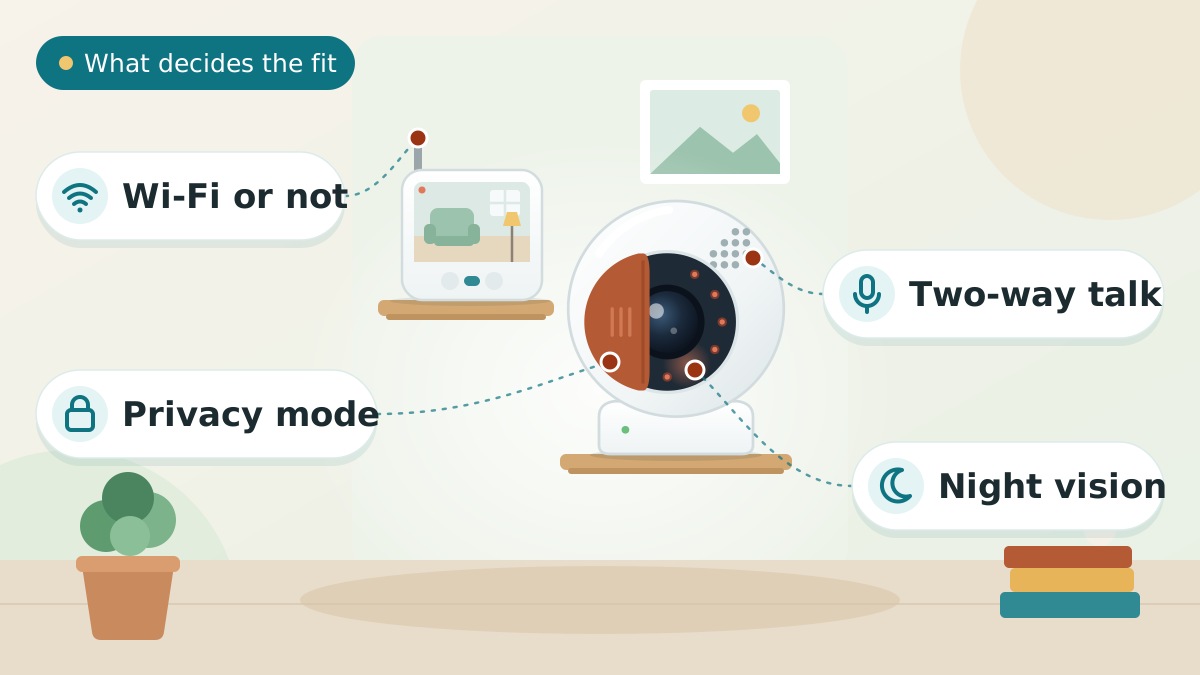
Most articles about monitoring an elderly parent skip the first question: does this need a camera at all? A motion sensor tells you someone got out of bed without filming them, and it is often the better answer. If you do want eyes on a room, what matters is not the brand on the box but the controls you hold — a physical shutter, storage that stays in the house, audio switched off, and never a bedroom or bathroom. Our picks below cover the three situations families actually find themselves in, and we name the brand we would not buy and why.
We may earn a commission when you buy through links on this page. Read our affiliate disclosure.

Our Top Pick
CallToU No-WiFi Elderly Monitor with Camera & Call Button
The only pick here where the video never leaves the house.
- No Wi-Fi, so footage cannot be intercepted, streamed or uploaded
- No account, no app and no subscription to manage
- Two-way talk, plus an SOS button your parent can press
- 4x zoom and a room-temperature readout on the screen
Connection
No Wi-Fi — camera pairs to its own screen
Where video goes
Handheld screen only
Range
Within the home
Extras
Two-way talk, SOS call button, 4x zoom, room temperature
Night vision
Yes
Top 3 Picks — Find Your Situation
Best forAnyone monitoring from elsewhere in the same house or building
- No Wi-Fi, so footage cannot be intercepted, streamed or uploaded
- No account, no app and no subscription to manage
- Two-way talk, plus an SOS button your parent can press
Watch out: Local range only — you cannot check in from away from home
 eufy Security 4K Indoor Camera E30 (2-Pack)Best for checking in from far away
Best forRemote family who want a physical off switch, not just a setting
- Physical shutter blocks the lens — not a software promise
- No subscription required for recording
- Pan and tilt covers a whole room from one spot
Watch out: It is a cloud-connected camera — see the brand history section below
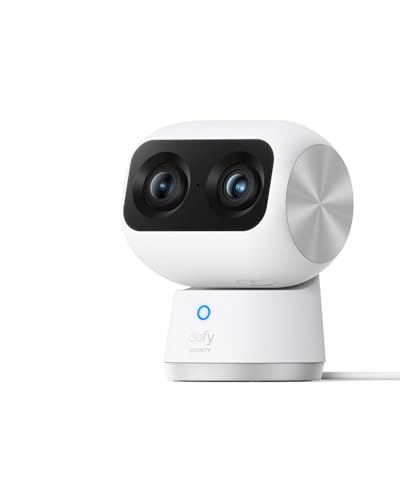 eufy Security 4K Indoor Cam S350Best coverage
Best forOne open-plan room where a single camera must cover everything
- Dual cameras and 8x zoom cover a whole room from one position
- No subscription for recording or detection features
- Auto-tracking keeps a moving person in frame
Watch out: Cloud-connected — see the brand history section below
CallToU No-WiFi Elderly Monitor with Camera & Call Button
Anyone monitoring from elsewhere in the same house or building
Every other camera on this page, and almost every camera you will find searching for one, works the same way: it joins your parent’s Wi-Fi, talks to a manufacturer’s server, and you watch through an app. That is what makes remote viewing possible, and it is also what creates every risk in the brand-history section below.
The CallToU sidesteps the whole category of problem by not joining the internet at all. The camera pairs directly with its own handheld screen. There is no account to be breached, no server to be misconfigured, no app permission to be quietly changed in an update. If you are in the same house — downstairs, in the next room, in an annexe — this is the honest answer.
It also happens to be more than a camera. The call button is arguably the more useful half: it lets your parent summon you deliberately, which preserves their agency in a way that being watched does not.
What we love
- No Wi-Fi, so footage cannot be intercepted, streamed or uploaded
- No account, no app and no subscription to manage
- Two-way talk, plus an SOS button your parent can press
- 4x zoom and a room-temperature readout on the screen
Things to consider
- Local range only — you cannot check in from away from home
- It is still a camera — common rooms only, never a bathroom or bedroom
- No recording history to review later
Right for you if
- ✓You live with your parent, or close enough to be in range
- ✓You want to see a common room without putting a cloud camera in the house
- ✓Your parent is uneasy about being watched but happy to have a call button
- ✓You do not want another app, account or subscription
Maybe skip it if
- !You live in another town and need to check in from your phone
- !You want recorded history to review later
- !You need alerts pushed to you while you are out
Getting started
- →Site it in a common room — living room, kitchen, hallway. Never a bedroom or bathroom.
- →Show your parent exactly what it sees, from their chair, before you leave it running.
- →Position it to cover the route between chair and bathroom, which is where most falls happen.
- →If a motion sensor alone would answer your question, consider one of those instead of a camera.
How it compares to our runner-up
The eufy E30 exists on this page for one reason: distance. If you cannot be in the same building, a local monitor cannot help you, and you have to accept a camera that talks to the internet. Choose on that basis rather than on features — the CallToU is not a worse camera, it is a different tool.
How we picked
We do not own or test these cameras. Specifications come from the manufacturers and their retail listings, cross-checked against published independent reviews. Because this page is about privacy, we also researched each brand’s security record through primary reporting and court filings — that research changed which products we would recommend, and it is set out in full below rather than buried. Where a manufacturer’s claim has been publicly contradicted, we say so.
Our picks, reviewed
CallToU No-WiFi Elderly Monitor with Camera & Call Button
The only pick here where the video never leaves the house. It skips Wi-Fi entirely, pairing the camera to its own handheld screen, so there is no app, no account, no cloud and nothing to breach. It adds two-way talk, night vision, 4x zoom and an SOS call button your parent can press for help — which makes it as much a call system as a camera.
What we like
- No Wi-Fi, so footage cannot be intercepted, streamed or uploaded
- No account, no app and no subscription to manage
- Two-way talk, plus an SOS button your parent can press
- 4x zoom and a room-temperature readout on the screen
Keep in mind
- Local range only — you cannot check in from away from home
- It is still a camera — common rooms only, never a bathroom or bedroom
- No recording history to review later
- Connection
- No Wi-Fi — camera pairs to its own screen
- Where video goes
- Handheld screen only
- Range
- Within the home
- Extras
- Two-way talk, SOS call button, 4x zoom, room temperature
- Night vision
- Yes
eufy Security 4K Indoor Camera E30 (2-Pack)
If you live too far away to use a local monitor, you have to accept that video leaves the house — so choose the camera that gives you the most control over when it is watching. The E30 has a physical lens shutter, which is the one privacy control no software toggle can replicate: closed, the lens is physically blocked. It pans and tilts to cover a room, records to a microSD card rather than requiring a subscription, and ships as a pair so you can cover a hallway and a living room. Read the brand history further down before you buy.
What we like
- Physical shutter blocks the lens — not a software promise
- No subscription required for recording
- Pan and tilt covers a whole room from one spot
- Two-way audio and colour night vision; works with HomeKit
Keep in mind
- It is a cloud-connected camera — see the brand history section below
- A two-pack, so compare the price against single-camera rivals
- AI tracking follows movement, which some parents find unsettling
- Resolution
- 4K
- Movement
- Pan and tilt
- Privacy control
- Physical lens shutter
- Storage
- Local microSD, no subscription
- Pack size
- Two cameras
eufy Security 4K Indoor Cam S350
The most capable camera here if one device has to cover an entire open-plan room. It uses two cameras with 8x zoom for 360-degree coverage and auto-tracks movement, and like the E30 it records without a subscription. It is the choice when a single well-placed camera has to do the job of two — but it is also the most surveillance-like of our picks, which is worth weighing against what your parent has agreed to.
What we like
- Dual cameras and 8x zoom cover a whole room from one position
- No subscription for recording or detection features
- Auto-tracking keeps a moving person in frame
- Works on 5 GHz as well as 2.4 GHz Wi-Fi
Keep in mind
- Cloud-connected — see the brand history section below
- Auto-tracking makes it feel more like surveillance than a check-in
- No physical lens shutter, unlike the E30 above
- Resolution
- 4K
- Coverage
- 360 degrees, dual camera
- Zoom
- 8x
- Storage
- Local, no subscription
- Wi-Fi
- 2.4 and 5 GHz
What to look for
Three situations, three answers
Almost every family searching for a camera is in one of three situations, and they need different things. Working out which one you are in settles the decision faster than any spec comparison.
- You are in the same house or building. A no-Wi-Fi monitor is the best answer available. Video never leaves the property, there is no account to breach, and you get two-way talk. That is our top pick.
- You live too far away to be in range. You need a cloud camera, and there is no way around it — remote viewing means the video travels. Choose for the controls you hold: a physical shutter, local storage, and audio you can switch off.
- You want to know if something has happened, not to watch. A motion or fall-detection sensor tells you your parent got up, or did not, or fell — without filming them at all. For many families this is the right answer and nobody suggests it. See our ambient fall detection sensors review.
That third option deserves more attention than it gets. If the question keeping you awake is "would I know if she fell?", a camera is a poor way to answer it — you would have to be watching at the moment it happened. A sensor answers it automatically and preserves your parent’s privacy completely.
The conversation to have before you buy anything
A camera in the home of a competent adult who has not agreed to it is surveillance, however loving the motive. It is also usually discovered, and the damage to trust outlasts whatever reassurance it bought.
- Ask first, and be specific. Which room, pointing where, who can see it, and when. "A camera in the living room so I can see you got up" is a proposal. "I have put a camera in" is a fait accompli.
- Offer the off switch. A camera your parent can physically close is a very different object from one they cannot. This is why the shutter matters more than the resolution.
- Agree the no-go rooms out loud. Bedrooms and bathrooms are not negotiable, and saying so unprompted does more for trust than any assurance about encryption.
- Where capacity is impaired, the calculus changes but the principle does not — use the least intrusive thing that answers the question, and involve whoever else is caring for them in the decision.
Audio is the legal problem, not video
Filming inside your own home, or a relative’s home with their agreement, is generally straightforward. Recording conversations is a different matter, and most of these cameras capture audio by default.
Several US states require the consent of everyone being recorded, not just one party. That can include a visiting friend, a neighbour, a home-care worker or a cleaner — none of whom agreed to anything. The exposure is real and it is easy to avoid.
- Turn audio recording off unless you have a specific reason for it and everyone in the household knows.
- Tell paid carers a camera is present. Many agencies require it, and covert recording of a worker is where the serious disputes start.
- Check your own state’s rule rather than assuming, because they differ substantially.
This is general information rather than legal advice — if a dispute is likely, take proper advice locally.
Where to put it, and where never to
- Living room or wherever they spend the day — the most useful single position.
- The route between chair and bathroom — where a large share of household falls happen.
- Never a bathroom. No exceptions, whatever the fall risk. Use grab bars and a shower seat instead.
- Never a bedroom. If night-time is the worry, a bed alarm or a motion sensor answers it without filming someone asleep.
- Point away from windows — backlighting ruins the image, and it avoids capturing the street or a neighbour’s property.
The brand history nobody mentions
We looked into the security record of every brand we considered, because a page recommending cameras on privacy grounds has to. What we found is that there is no clean brand — and that is the single most useful thing on this page.
eufy, which markets itself hard on local storage and no subscriptions, was found in November 2022 to be uploading data to the cloud even when cloud storage was switched off, with live streams viewable in an ordinary media player without encryption or a password. In February 2023 its parent company Anker admitted to The Verge that its cameras were not natively end-to-end encrypted and had produced unencrypted streams — an admission made only after the publication said it was running the story. Class actions followed. The company brought in outside auditors, and its own wording changed from "your data is stored locally" to "Local Security", with the current policy acknowledging that some metadata and thumbnails are processed in the cloud to deliver alerts.
We still recommend two eufy cameras, for a reason worth stating plainly: the alternatives are not cleaner. Every competitor at this price has either a comparable incident or an unresolved question about who ultimately makes the hardware. What eufy now has, that it did not have in 2022, is external scrutiny and more honest wording. We would rather recommend a company that has been caught and corrected than one that has not been examined.
We do not recommend Wyze, despite it being the cheapest and most frequently suggested option. In February 2024 roughly 13,000 Wyze users were shown thumbnails from cameras that were not theirs, and about 1,500 clicked through — in some cases reaching recorded video from a stranger’s home. A similar incident had occurred five months earlier, and a 2019 leak exposed millions of customer email addresses. At least one major review site has since removed Wyze from its recommendations. For a camera pointed at a vulnerable person, that record is disqualifying.
On country of origin: nearly every consumer camera brand in this price range is manufactured in China, including several marketed as American. Some brands sold as US companies build on hardware from manufacturers that US federal agencies are barred from buying. Those rules bind federal procurement, not households, so this is not a legal issue for you — but it does affect how long a product keeps receiving firmware updates, which matters for a device left running for years.
Settings to change on the day it arrives
Whatever you buy, these take ten minutes and do more for privacy than the brand you chose.
- Turn audio off unless you have decided you need it and said so to everyone in the house.
- Use two-factor authentication on the account. Most of the incidents that expose home cameras involve account access, not clever hacking.
- Set a unique password. A reused one is how a camera ends up on a stranger’s screen.
- Choose local storage where the camera offers it, and buy the memory card.
- Turn off anything you do not use — particularly facial recognition, which creates the most sensitive data of all.
- Close the shutter, or unplug it, when you visit. The point of a physical control is using it.
Cameras in a care home or assisted living
A camera in a facility room is a different question from a camera in your parent’s own home, and the answer is not the same.
A number of US states have specific "granny cam" statutes setting out when a camera may be placed in a resident’s room. These commonly require the resident’s written consent, the consent of any roommate, notice to the facility, and a visible sign. Rules vary widely and some states have none at all.
Recording covertly is where families get into difficulty. Staff and roommates have their own privacy rights, audio consent laws apply exactly as they do at home, and footage obtained improperly may be useless in precisely the dispute it was gathered for.
- Check your state’s specific statute before installing anything.
- Ask the facility for its written policy — many have one, and following it protects you.
- Get the roommate’s agreement if the room is shared.
- If you suspect neglect or abuse, contact your state’s long-term care ombudsman as well as, or instead of, installing a camera. That route has authority a recording does not.
Frequently asked questions
It depends on where you are. If you are in the same house, a no-Wi-Fi monitor like the CallToU is best because the video never leaves the property. If you live far away you need a cloud-connected camera, and the eufy E30 is our pick because its physical lens shutter is a privacy control no software setting can match. If you only need to know whether they got up or fell, a motion or fall-detection sensor does that without filming anyone.
Yes. Devices such as the CallToU pair the camera directly with their own handheld screen over a local radio link, with no internet connection, no account and no app. That means the footage cannot be uploaded, intercepted or exposed in a company data breach. The trade-off is range: these only work within the home, so they suit someone monitoring from another room rather than another city.
Video in a private home is generally straightforward if the homeowner agrees. Audio is the harder question, because several US states require consent from everyone recorded, which can include visitors and paid carers. The safest course is to turn audio recording off, tell any care workers a camera is present, and check your own state’s rule. This is general information, not legal advice.
No. Those are the two rooms to rule out regardless of fall risk. For night-time worries, a bed alarm or a motion sensor tells you they have got up without filming them asleep. For the bathroom, grab bars, a shower seat and a non-slip mat reduce the actual risk, which a camera never does — it only records the fall happening.
If they have capacity, yes — ethically and often practically, since cameras are usually discovered. Ask before installing, be specific about which room and what it sees, and agree the no-go rooms out loud. Where capacity is impaired the calculus changes, but the principle holds: use the least intrusive option that answers the question, and involve everyone sharing the care in the decision.
Most of them. eufy was found in 2022 to be uploading data despite local-storage marketing, and its parent company admitted in 2023 that its cameras were not natively end-to-end encrypted. Wyze exposed roughly 13,000 users to thumbnails from strangers’ cameras in February 2024, after a similar incident months earlier. We recommend eufy with that history disclosed and do not recommend Wyze at all. The practical conclusion is to rely on controls you hold — a shutter, local storage, audio off — rather than any brand’s promise.
Sometimes, and it depends on your state. Several states have specific "granny cam" laws that typically require the resident’s written consent, a roommate’s consent, notice to the facility and a visible sign. Recording covertly can breach staff and roommate privacy and may make the footage unusable in a dispute. Check the statute, ask the facility for its policy, and if you suspect neglect contact your state long-term care ombudsman as well.
A sensor, in almost every case. A camera only helps if you happen to be watching at the moment of the fall, whereas a fall-detection sensor alerts you automatically and records nobody. Cameras are for seeing how someone is doing during the day; sensors are for knowing when something has happened. Many families discover they wanted the second thing.
The final verdict
If you are in the same house, buy the CallToU — nothing else here keeps video off the internet entirely, and the call button may matter more than the camera. If you are far away, the eufy E30 is the pick, because a physical shutter is the only privacy control that cannot be undone by a software update, a breach or a policy change. Choose the S350 only if one camera genuinely has to cover an entire open-plan room. And before any of it, ask whether a camera is what you need at all: if the question is "would I know if she fell?", an ambient fall sensor answers it better and films nobody.
Our overall winner is the CallToU No-WiFi Elderly Monitor with Camera & Call Button — our our pick for most seniors. You can check the current price on Amazon to see today’s deal.
