
6 Best Dementia Clocks for Seniors
 By Kutubuddin, Founder & Senior Care Researcher Updated October 2026
In this guide
 Best OverallAmerican Lifetime Day Clock
 Best with Reminders & Auto-DimmingJALL 8" Large Digital Calendar Day Clock
 Best CompactDigital Calendar Alarm Clock (Non-Abbreviated)
 Best for Voice & Low VisionORKA Talking Clock
 Best Extra-Large Display10.1-Inch Extra Large Digital Clock
 Best Battery-OperatedAtomic Battery-Operated Digital Wall Clock
- What to look for
- Frequently asked questions
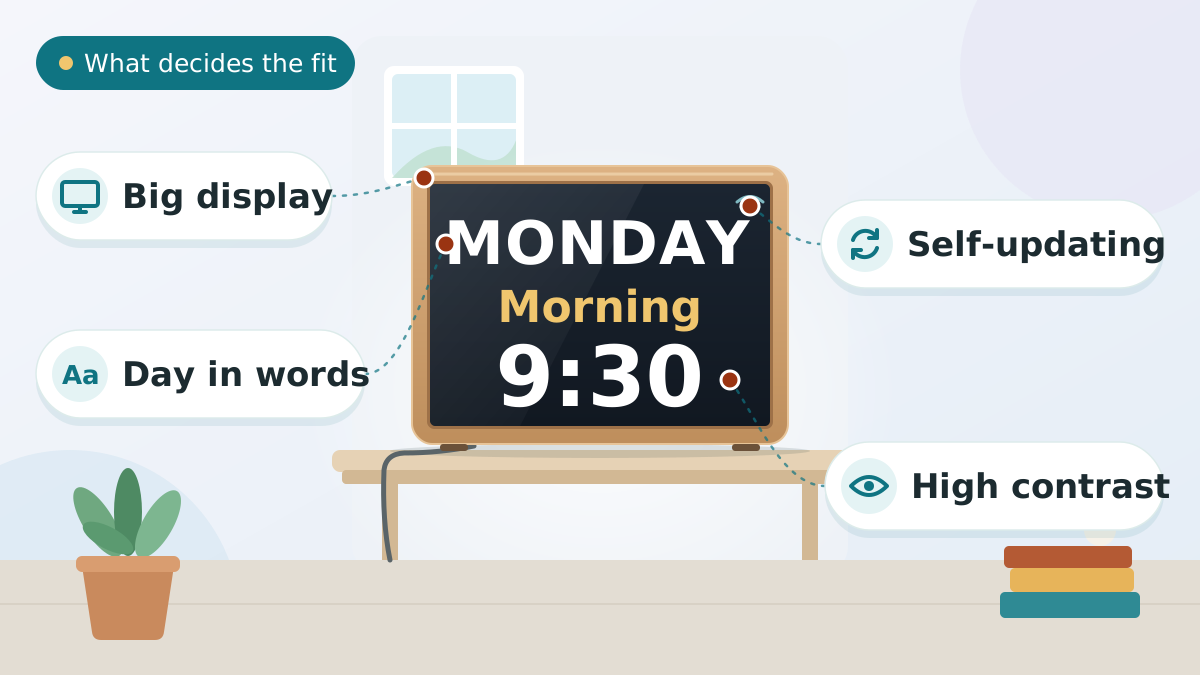
A dementia clock spells out the day, date and time in large, plain text — easing the confusion and repeated 'what day is it?' that come with memory loss, and helping with the day-night confusion behind sundowning. What matters most: a big, high-contrast display, the time of day stated in words rather than just AM/PM, and a clock that updates itself, since a person with dementia cannot reset one.
Our overall pick is the American Lifetime Day Clock. Below, six options across display-only, reminder, voice, extra-large and cordless battery-operated. Looking for the clock-drawing cognitive test instead, where someone draws a clock? That is a different thing — see our clock drawing test guide.
We may earn a commission when you buy through links on this page. Read our affiliate disclosure.
Our Top Pick
American Lifetime Day Clock
The most complete and trusted day clock.
- Full day, date, and time of day in plain words
- Large, high-contrast display
- Battery backup keeps time through power cuts
- Battery backup keeps time in a power cut
- Optional reminders and auto-dimming
Display
Spells out day, date, time of day
Updating
Battery backup; DST is manual
Reminders
Optional medication/appointment
Screen
Auto-dimming
Power
Plug-in with backup
Top 6 Picks — Find Your Situation
- American Lifetime Day ClockBest Overall
Best forMost seniors who need a clear, self-updating day-and-date clock
- Clear, easy-to-read display
- Keeps the time through power cuts
- Reduces repeated date questions
Watch out: Setting up reminders takes a minute
- JALL 8" Large Digital Calendar Day ClockBest with Reminders & Auto-Dimming
Best forSeniors who need several daily reminders plus a bright, wide-angle display
- Up to 12 alarms for pills and meals
- Wide-angle IPS is readable off-center
- Auto-dimming for bedrooms
Watch out: More alarms to set up initially
- Digital Calendar Alarm Clock (Non-Abbreviated)Best Compact
Best forSeniors who want a full-featured day clock in a smaller, bedside-friendly footprint
- Compact 7-inch size fits a bedside table
- Fully spelled-out day, date, and time
- Up to 12 alarms with Meal/Medicine/Appointment tags
Watch out: Smaller 7-inch screen than the 8-inch picks
- ORKA Talking ClockBest for Voice & Low Vision
Best forSeniors with low vision, or who respond best to spoken reminders
- Spoken reminders for pills and appointments
- Talking time — great for low vision
- Multiple customizable alarms
Watch out: Pricier than display-only clocks
- 10.1-Inch Extra Large Digital ClockBest Extra-Large Display
Best forSeniors who need the biggest, highest-contrast display in the room
- Very large, high-contrast HD screen
- 10 reminders and 6 alarms
- Auto-dimming and automatic DST
Watch out: Large footprint needs shelf space
- Atomic Battery-Operated Digital Wall ClockBest Battery-Operated
Best forA cordless, self-setting clock for a bedside or any spot without an outlet
- No wires — ideal for a bedside or a wall with no outlet
- Sets itself and handles daylight saving automatically
- Clear, separated day / date / time display
Watch out: Shows day and date clearly, but does not spell out the time of day (morning/afternoon/night) like a dedicated day clock
American Lifetime Day Clock
Most seniors who need a clear, self-updating day-and-date clock
The American Lifetime Day Clock wins because it does the core job exceptionally well and adds useful extras without losing clarity. Its large display spells out the full day, date, and time of day in plain text that's easy to read across a room, and — crucially — it sets itself, adjusts for daylight saving, and keeps time through a power cut, so it never shows the wrong information and confuses the person it's meant to help.
On top of that foundation, it offers optional medication and appointment reminders and an auto-dimming screen, so you can add gentle prompts and keep it comfortable at night. It's the most complete day clock that still stays simple to read, which is exactly the balance dementia care needs. Setting up reminders takes a moment, and a very late-stage user may not interpret any clock, but for most it's the clear first choice.
What we love
- Clear, easy-to-read display
- Keeps the time through power cuts
- Reduces repeated date questions
- Trusted, widely recommended
Things to consider
- Setting up reminders takes a minute
- Very late-stage users may not interpret it
- Brightness preferences vary
Right for you if
- ✓You want a clear day/date clock that updates itself
- ✓You'd like optional medication or appointment reminders
- ✓You want auto-dimming for comfortable nighttime use
- ✓You value a trusted, widely recommended brand
Maybe skip it if
- !You want the simplest, no-clutter display — choose DayClox
- !A familiar recorded voice helps more — Reminder Rosie fits
- !You're on a tight budget — the Famicozy covers the basics
What owners consistently report
Common praise
- +Owners report fewer repeated 'what day is it?' questions
- +The clear display and self-updating are frequently praised
- +Reminders help keep routines on track
Common gripes
- –Setting up reminders takes a minute at first
- –Very late-stage users may not interpret a clock
- –Brightness preferences differ between people
Getting started
- →Place it at eye level where the person looks often
- →Set the time zone and any reminders once during setup
- →Enable auto-dimming so it's gentle at night
How it compares to our runner-up
The SVINZ Dementia Clock is the better pick when you need several medication reminders and finer brightness control — it offers multiple alarms with messages and more dimming levels. The American Lifetime is clearer and simpler for pure orientation. Choose the SVINZ for reminder-heavy routines, the American Lifetime for the clearest all-round day clock.
How we picked
We compared 6 options. We compared today's most recommended dementia clocks on what matters for orientation: display clarity and size, whether they spell out the day, date, and time of day in plain words, auto-setting and battery backup, optional reminders or alarms, auto-dimming, and ease of setup. Our picks draw on manufacturer specs, dementia-care guidance, and owner feedback — not hands-on lab testing. We prioritized clocks that state the time of day in words and update themselves, because the person using one usually can't.
Reviewed by Kutubuddin — who researches senior-care products and the real-world needs of caregivers and older adults.
Our picks, reviewed
American Lifetime Day Clock
Read our full American Lifetime Day Clock reviewThe most complete and trusted day clock. Its large display spells out the full day, date, and time of day in clear text, readable across a room, and its battery backup keeps the time through power cuts, though daylight saving is a manual change. Optional medication and appointment reminders and an auto-dimming screen round it out without cluttering the core display.
What we like
- Clear, easy-to-read display
- Keeps the time through power cuts
- Reduces repeated date questions
- Trusted, widely recommended
Keep in mind
- Setting up reminders takes a minute
- Very late-stage users may not interpret it
- Brightness preferences vary
Key features
- Full day, date, and time of day in plain words
- Large, high-contrast display
- Battery backup keeps time through power cuts
- Battery backup keeps time in a power cut
- Optional reminders and auto-dimming
- Display
- Spells out day, date, time of day
- Updating
- Battery backup; DST is manual
- Reminders
- Optional medication/appointment
- Screen
- Auto-dimming
- Power
- Plug-in with backup
JALL 8" Large Digital Calendar Day Clock
Read our full JALL 8" Large Digital Calendar Day Clock reviewThe pick when medication reminders matter. This 8-inch clock spells out the full day and date on a wide-angle IPS screen that stays readable from an angle or across a room, and it carries up to 12 custom alarms for prompting pills, meals, or appointments. Auto-dimming quiets the screen at night, and a battery backup keeps the time through power cuts.
What we like
- Up to 12 alarms for pills and meals
- Wide-angle IPS is readable off-center
- Auto-dimming for bedrooms
- Large, clearly spelled-out day and date
Keep in mind
- More alarms to set up initially
- Busier than a display-only clock
- Reminders rely on the person noticing
- Display
- 8" IPS, wide viewing angle
- Reminders
- 12 custom alarms
- Dimming
- Automatic day/night
- Shows
- Day & date, large text
- Power
- Plug-in
Digital Calendar Alarm Clock (Non-Abbreviated)
Read our full Digital Calendar Alarm Clock (Non-Abbreviated) reviewOur compact pick: a full-featured day clock in a smaller 7-inch body. It spells out the full day, date, and time in plain words — no confusing abbreviations — and carries up to 12 alarms with Meal, Medicine, and Appointment tags, plus auto-dimming. The 7-inch footprint fits a bedside table or a tight shelf where an 8-inch model is too big, and a power-outage backup restores the time when power returns.
What we like
- Compact 7-inch size fits a bedside table
- Fully spelled-out day, date, and time
- Up to 12 alarms with Meal/Medicine/Appointment tags
- Auto-dimming with 5 brightness levels
Keep in mind
- Smaller 7-inch screen than the 8-inch picks
- LCD viewing angle narrower than an IPS screen
- Plug-in only, and no automatic daylight-saving
- Size
- 7-inch, compact
- Display
- Full day/date + 5-period
- Alarms
- 12 modes + Meal/Medicine tags
- Dimming
- Auto + 5 brightness levels
- Power
- Plug-in + outage backup
ORKA Talking Clock
Read our full ORKA Talking Clock reviewThe choice when a familiar voice helps most. It announces the time aloud and plays voice-recordable medication and appointment reminders — ideal for seniors with low vision or anyone who responds better to sound than to a screen. Multiple customizable alarms make it a genuine eyes-free reminder tool as well as a day clock.
What we like
- Spoken reminders for pills and appointments
- Talking time — great for low vision
- Multiple customizable alarms
- Reassuring, eyes-free operation
Keep in mind
- Pricier than display-only clocks
- Recording reminders takes setup
- Audio prompts can be missed if not heard
- Reminders
- Voice-recordable, multiple
- Audio
- Talking time announcements
- Access
- Eyes-free / low-vision friendly
- Alarms
- Multiple customizable
- Power
- Plug-in
10.1-Inch Extra Large Digital Clock
Read our full 10.1-Inch Extra Large Digital Clock reviewThe pick for the largest, clearest screen. Its 10.1-inch 1280x800 HD display shows the date, time, and day of week in big, high-contrast text that is easy to read from across a room or with weak eyesight. Up to 10 reminders and 6 alarms cover pills and appointments, and auto-dimming plus remote control make it simple to live with.
What we like
- Very large, high-contrast HD screen
- 10 reminders and 6 alarms
- Auto-dimming and automatic DST
- Remote control for easy setup
Keep in mind
- Large footprint needs shelf space
- More features than display-only users need
- Screen brightness preferences vary
- Display
- 10.1" HD, 1280x800
- Reminders
- 10 reminders, 6 alarms
- Dimming
- Auto + DST
- Control
- Remote included
- Power
- Plug-in
Atomic Battery-Operated Digital Wall Clock
The only fully cordless pick here. It runs on 3 AAA batteries with no wires, so it can go where the others can't — a bedside table, or a wall with no nearby outlet. It is also 'atomic': a built-in receiver syncs to the WWVB radio signal and resets the time itself every night, including the daylight-saving change, so no one has to set it — exactly what you want for someone who can't reset a clock. The 6.2 x 3.7 inch display shows time, day, date, and indoor temperature in separate, easy-to-read sections, with a low-battery warning. The honest trade-off: it shows the day and date clearly but does not spell out the time of day in plain words (morning, afternoon, night) the way a dedicated day clock does, and the self-setting feature needs to be within range of the WWVB signal.
What we like
- No wires — ideal for a bedside or a wall with no outlet
- Sets itself and handles daylight saving automatically
- Clear, separated day / date / time display
- Low-battery warning so it will not quietly show the wrong time
Keep in mind
- Shows day and date clearly, but does not spell out the time of day (morning/afternoon/night) like a dedicated day clock
- Self-setting needs WWVB signal range; batteries need occasional replacing
Key features
- Fully cordless — runs on 3 AAA batteries, place anywhere
- Atomic self-setting: syncs to WWVB radio, no manual setting
- Automatic daylight-saving adjustment
- Separated day, date, time, and indoor-temperature sections
- Low-battery warning; optional alarm; 12/24-hour modes
- Type
- Atomic self-setting digital clock
- Power
- Battery (3x AAA, not included)
- Display
- 6.2 x 3.7 in; day, date, time, temp
- Self-set
- Syncs to WWVB radio; auto DST
- Extras
- Alarm; 12/24h; low-battery alert
What to look for
Spell it out in plain words
The whole point of a dementia clock is clarity, so it should state things in language, not codes.
The best ones show the full day, date, and part of day in plain text — "Monday, June 27, 2026 — Morning" — rather than cryptic abbreviations. Stating the time of day in words (Morning, Afternoon, Evening, Night) is clearer than AM/PM for someone with dementia and directly helps with day-night confusion.
Big, high-contrast, glare-free display
If the person can't read it easily, it won't help.
Look for large digits and words that are legible across the room, with high contrast — dark text on a light background or the reverse — and a matte, glare-free screen. A big, clear display also serves the low vision that often accompanies aging.
Auto-setting and battery backup
This is non-negotiable: the clock must keep itself correct.
Choose one that sets and updates itself, handles daylight saving automatically, and keeps time through a power cut with battery backup. A person with dementia can't reset a clock, and a clock showing the wrong day or time causes more confusion than no clock at all.
Reminders and alarms — keep them simple
Some clocks add prompts, which can help, but more isn't always better.
Medication or appointment reminders, shown as text or played in a recorded voice, can prompt important routines. Just make sure the extra features don't clutter the core day-and-date display — for many people, the simplest clock is the most effective one.
Auto-dimming, power, and placement
A few practical details make a clock easy to live with.
Auto-dimming keeps it readable by day and gentle at night so it doesn't disturb sleep. Most are plug-in with battery backup. Place it where the person looks most often — the bedside, the kitchen, or beside a favorite chair — at eye level so it's easy to glance at.
Tips to Choose Dementia Clocks
Short on time? Here are the key points to weigh before choosing, each covered in detail above:
- Spell it out in plain words
- Big, high-contrast, glare-free display
- Auto-setting and battery backup
- Reminders and alarms — keep them simple
- Auto-dimming, power, and placement
Comparing options? See our guides to Best Elderly Monitoring Systems, Best Medical Alert Devices for Seniors, and Best Ai Ambient Fall Detection Sensors.
What a dementia clock can and can't do
It helps to be realistic about a clock's role so you choose well and set expectations.
A dementia clock genuinely reduces anxiety and repeated questions by keeping the person oriented, and it helps most in earlier stages. It won't restore memory, though, and in later stages the person may no longer interpret it. So pair it with a consistent daily routine, an automatic pill dispenser for medication timing, and caregiver support. Our dementia home safety guide covers the wider picture.
Clocks, routine, and sundowning
Orientation and routine work together to keep a person with dementia calmer.
A clear day-and-night indicator can ease sundowning and day-night confusion, and it supports the predictable routine that helps people with dementia feel secure. Combine the clock with consistent meal and sleep times, plenty of daytime light, and warm, dim lighting at night. If confusion is driving wandering, pair it with door alarms and a GPS tracker.
Frequently asked questions
No. A day clock can ease the confusion and anxiety around time and orientation, which many families find genuinely helpful — but it is a comfort and quality-of-life aid, not a treatment for dementia. For a diagnosis, or if you notice a sudden change in memory, confusion, or behaviour, speak with your loved one's doctor, since a fast change can signal something treatable.
A dementia clock — often called a day clock — displays the day, date, and time of day in large, plain text to keep a person with memory loss oriented. By clearly showing whether it's morning or evening and what day it is, it reduces the confusion and anxiety behind repeated questions like 'what day is it?' and helps with day-night confusion. It's one of the simplest, most reassuring tools in dementia care.
For many people, yes — especially in the earlier and middle stages. A clear, always-correct display answers the orientation questions that cause anxiety, often noticeably reducing repeated date and time questions and easing restlessness. The benefit depends on the stage: someone in later stages may no longer interpret a clock, which is why it works best as part of a routine rather than on its own.
Bigger is better. Choose a clock with a large display — commonly 8 inches or more — with text big enough to read comfortably from across the room and from a chair or bed. Large, high-contrast lettering also helps the low vision that often accompanies aging. The day, date, and time of day should each be clearly legible at a glance.
Time-of-day words are clearer for dementia. Stating 'Morning,' 'Afternoon,' 'Evening,' or 'Night' in plain language is easier to grasp than AM/PM, and it directly helps with day-night confusion — a common source of distress and sundowning. Many clocks let you choose, but for someone with significant memory loss, the worded time of day is usually the better setting.
Many can. Clocks like the SVINZ offer several daily alarms with on-screen messages, and Reminder Rosie plays reminders in a recorded voice, both useful for prompting pills or meals. They work best for people who still respond to prompts; for reliable dosing, pair them with a pill organizer or an automatic dispenser, since a reminder only helps if the person acts on it.
They can help. A clear day-and-night indicator reinforces what time it actually is, which can ease the day-night confusion that contributes to sundowning. Combined with a steady routine, bright light during the day, and warm, dim light in the evening, a clock supports the orientation that helps reduce late-day agitation — though sundowning usually needs a broader approach too.
Put it where the person naturally looks throughout the day — the bedside is ideal for orienting them on waking, and the kitchen or a spot near a favorite chair works for daytime. Place it at eye level, in good light but free of glare, and keep it in the same place consistently so it becomes a reliable reference point.
It depends on the person. Talking clocks like Reminder Rosie are excellent for low vision or for someone who responds well to a familiar voice, since they're eyes-free. Digital display clocks suit people who can still read and prefer a visual reference they can glance at silently. Some households use both — a display clock for constant reference and voice reminders for key prompts.
A clock supports orientation but won't address significant memory loss, safety risks, or the needs of late-stage dementia, when the person may no longer interpret it. At that point, focus shifts to routine, supervision, medication management, and safety measures like door alarms and GPS tracking. Think of a clock as one helpful piece of a much larger care plan, not a standalone solution.
Generally no. Medicare typically classifies dementia clocks as everyday items rather than covered durable medical equipment, so they're usually an out-of-pocket purchase. They're inexpensive relative to many care costs, and HSA or FSA funds can sometimes be used. Check your specific plan, and look into local aging or Alzheimer's organizations that occasionally help with assistive items.
It varies by model, but on most dementia clocks the time and date are set with small buttons on the back or underneath — usually a 'SET' or 'MODE' button you hold, then plus/minus buttons to adjust, and 'SET' again to save. Many of the better clocks set themselves automatically and only need the time zone chosen once. Keep the manual (or a photo of the setup steps) handy, because you may need to nudge the time after a daylight-saving change or a long power loss — and the whole point of these clocks is that the person using them can't reset one themselves.
Most large day-and-date dementia clocks plug into the wall, because a bright, always-on display draws more power than batteries would sustain — and many include a small battery backup so the settings survive a power cut. Purely battery-operated models exist and are handy for a bedside or a spot with no nearby outlet, but expect a dimmer screen and periodic battery changes. If you go battery-only, choose one that clearly shows a low-battery warning, since a dead clock showing the wrong time is worse than none for someone with memory loss.
The final verdict
For most seniors, the American Lifetime Day Clock is the best choice — a clear, self-updating display with optional reminders. Choose the SVINZ when you want multiple medication alarms and fine auto-dimming, DayClox for the simplest, least cluttered display, Reminder Rosie for personalized voice reminders and low vision, or the Famicozy on a budget. Pick a clock that spells out the time of day in words and sets itself, place it where the person looks often, and remember it's an orientation aid that works best alongside routine, reminders, and support — not a fix for memory loss.
Our overall winner is the American Lifetime Day Clock — our best overall for most seniors. You can visit the official site
