
GrandPad Review: The Tablet for Seniors Who Have Never Used One
 By SK Kutubuddin, Founder & Senior Care Researcher Updated October 29, 2026
In this guide
The GrandPad is an 8-inch tablet with its own 4G connection and a locked-down, large-button system that family members manage from their own phones. It needs a monthly plan.
The GrandPad does one thing better than any ordinary tablet: it puts a parent who has never used technology on a video call with family, with no passwords, no app store, no Wi-Fi to set up and nothing to break. It arrives connected over its own 4G service. Family members add contacts, photos and settings remotely, and 24/7 support is a phone call away.
The price of that simplicity is real. You pay for the device and a required monthly plan, for as long as you use it. It also cannot do what a normal tablet does: no app store, no Netflix, and internet limited to a set of preloaded sites. Where you buy it matters a lot: Consumer Cellular’s bundle has been reported as the cheapest way to own and run one.
If your parent can already use a smartphone, or you are willing to set up an Echo Show or an iPad for them, you will pay far less. If they truly cannot manage any technology, the GrandPad is worth it.
We may earn a commission when you buy through links on this page, at no extra cost to you. Read our affiliate disclosure.
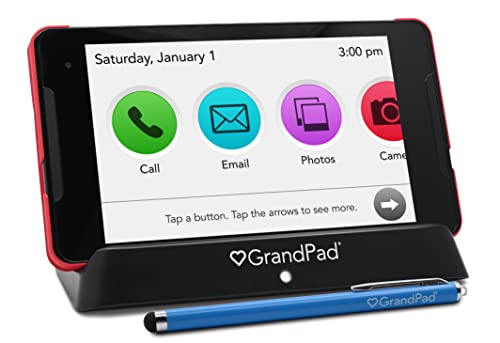
GrandPad Easy-to-Use Tablet & Phone for Seniors (Plan Required)
A parent who has never used a smartphone or tablet, possibly with no home Wi-Fi, whose family wants to set everything up and manage it remotely
- Works out of the box over its own 4G connection, with no Wi-Fi to set up
- Big, simple buttons, with no passwords, updates or app store to confuse
- Only approved family and friends can call, so no scam calls
- Family manages contacts, photos and settings remotely from their phones
- Charging cradle with a light and chime makes charging simple
- 24/7 phone support for both the senior and the family
Type
Locked-down senior tablet and phone
Screen
8-inch, 1920 × 1200
Connection
Built-in 4G LTE; Wi-Fi optional
Calls
Voice and video calls to approved contacts
Family control
Companion app and GrandPad Central web portal
Apps
Preloaded only: photos, email, music, radio, games, weather, Grandie AI companion
In the box
Charging cradle, folding stand case, stylus
Plan
Required monthly service plan
Support
24/7 phone support
What we like
- Works out of the box over its own 4G connection, with no Wi-Fi to set up
- Big, simple buttons, with no passwords, updates or app store to confuse
- Only approved family and friends can call, so no scam calls
- Family manages contacts, photos and settings remotely from their phones
- Charging cradle with a light and chime makes charging simple
- 24/7 phone support for both the senior and the family
Worth noting
- A monthly plan for as long as you use it, which adds up to much more than the device
- Cannot install apps: no Netflix, YouTube app, Facebook or banking apps
- Internet limited to a set of preloaded websites
- Locked to GrandPad’s service; it cannot be used with another carrier
- Heavier than some tablets to hold for long calls
- The stylus is easy to lose
Buy it if…
- Your parent has never used a smartphone or tablet
- There is no Wi-Fi at their home, or no one nearby to fix it
- You want to control who can contact them
- Several family members want to share photos and calls from different places
Look elsewhere if…
- Your parent already uses a smartphone or tablet comfortably
- You want no monthly fees: an Echo Show or Fire tablet costs nothing after purchase
- They want Netflix, YouTube, Facebook or other mainstream apps
- They cannot answer a call at all: an auto-answer frame such as ViewClix suits them better
What the GrandPad is
The GrandPad is a tablet built for people who have never used one. It is an 8-inch tablet that runs GrandPad’s own simple screen of large buttons for Calls, Photos, Email, Music, Weather, Games and a few more.
It has its own 4G LTE connection, like a phone, so it works the moment it is switched on, with no Wi-Fi network or password to set up. It arrives in a case that folds into a stand, with a charging cradle that lights up and chimes when the tablet is docked.
The other half of the product is the family side. Approved family members join the parent’s Family Circle. They can call, send photos and messages, and manage the tablet’s contacts and settings from the GrandPad Companion app on their own phone.
GrandPad Central and the Companion app (for family)
Many searches for “GrandPad Central” and “GrandPad login” come from family members, not seniors. GrandPad Central is the web portal family members use to manage a GrandPad from a computer. The Companion app does the same from an iPhone or Android phone.
- Add or remove approved contacts. Only people in the Family Circle can call or message the tablet.
- Send photos and videos that appear on the GrandPad.
- Choose which apps the senior sees.
- Get help remotely, without having to visit.
If you cannot log in, use GrandPad’s official site or app, or call support. Do not use links from unsolicited emails.
What the GrandPad really costs
The GrandPad has two costs: the device and a required monthly plan. The plan pays for the 4G data, the management system and support, and the tablet does nothing useful without it. Prices also vary a lot depending on where you buy.
The bottom line: over two years, the plan costs several times more than the tablet. Budget for the monthly fee, not just the device. If you buy from Amazon, check which service plan the listing requires and its monthly price before you order. Reviewers have reported that the cheapest route has been Consumer Cellular’s bundle.
| Where you buy | Device | Monthly plan |
|---|---|---|
| Consumer Cellular | $299, or $11 down + $12/mo | About $40/mo ($38 with AARP) |
| GrandPad direct | About $349 | About $65–$95/mo |
| Amazon / Walmart | See current listing | About $65/mo reported |
What your parent can do with it
- Video and voice calls to anyone in the Family Circle, by tapping their photo.
- Photos that family send automatically appear in the gallery.
- Email and text messages with the Family Circle.
- Music and FM radio, news articles and weather.
- Games, including some that family can play together.
- Grandie, a built-in AI companion for conversation and trivia.
- A limited web browser with a set of preloaded sites.
The front and rear cameras are 5 megapixel. Reviewers describe the picture as decent for video calls.
What it cannot do
Everything that makes the GrandPad simple also limits it. There is no app store, so you cannot add Netflix, the YouTube app, Facebook, WhatsApp or banking apps. The browser only opens preloaded sites. There is no full screen reader for people with serious sight loss.
For a parent who has never used technology, these limits are a feature: nothing to get lost in, and nothing to break. For a parent who is reasonably confident, they will feel frustrating, and an ordinary tablet set up simply will serve them better for less.
Watch for overuse of the power button. Reviewers note there is no standby button: closing the case puts the screen to sleep, while the power button switches the tablet fully off. Teach your parent to close the case, not press the button, or calls will not come through.
GrandPad alternatives
Amazon Echo Show: a smart display you call by saying a name, with no monthly fee. It needs home Wi-Fi. Our top video-calling pick for most families. See our best video calling devices guide.
Amazon Fire tablet: a cheap tablet that family can set up, with no plan needed. It is far less locked-down, so it suits parents with some confidence.
iPad with Assistive Access: recent iPadOS versions include Apple’s Assistive Access mode, which simplifies the iPad to a few large buttons. A good choice in an Apple family, though setup takes effort.
ViewClix Smart Frame: a photo frame that auto-answers approved video calls, for a parent who cannot answer a call at all.
For low vision, compare our tablets for seniors with poor vision guide.
What GrandPad says
The following are GrandPad’s own marketing claims from the product listing, not our independent findings. Details can change over time — check the current Amazon listing for the latest.
- GrandPad describes its tablet as designed for seniors, with built-in 4G LTE so no Wi-Fi is required, and a simplified interface with no passwords.
- Only approved members of the senior’s Family Circle can call or message the GrandPad; family manage it through the Companion app or GrandPad Central.
- GrandPad includes 24/7 customer support, a charging cradle, a folding stand case and a stylus.
- The Amazon listing states the tablet is locked, not compatible with other wireless carriers, and requires a plan.
How it compares to other video-calling devices
The GrandPad is the most hand-held option for a senior with no tech experience. If your parent can manage even a little technology, or has Wi-Fi, cheaper devices with no monthly fee will do the job.
- Amazon Echo Show 8 — voice-activated video calls and no monthly fee. Needs home Wi-Fi. Our top pick for most families.
- ViewClix Smart Frame — auto-answers approved calls with no touch needed. Best when a parent cannot answer a call at all.
- Tablets for low vision — larger screens and accessibility settings for a parent with sight loss who wants a full tablet.
Frequently asked questions
For a parent who has never used technology, often yes: it gets them on video calls with family, with nothing to set up or break. For a parent who can use a smartphone, or a home with Wi-Fi and family willing to set things up, cheaper devices with no monthly fee do the job.
It depends where you buy it. Reviews in 2025 and 2026 reported about $40 a month through Consumer Cellular ($38 for AARP members), about $65 to $95 a month direct from GrandPad, and about $65 a month for units bought through Amazon or Walmart. Check current prices before buying.
No. The GrandPad has its own built-in 4G LTE connection, included in the monthly plan. Wi-Fi is optional.
Yes. The GrandPad can send and receive messages with members of the Family Circle, as well as email.
No. There is no app store. The GrandPad comes with its own preloaded apps and a limited set of websites. That keeps it simple and safe, but means no Facebook, YouTube app, Netflix or banking apps.
Yes, for voice and video calls to approved contacts in the Family Circle. It is a tablet, so it is not a pocket phone, and only approved people can call it.
GrandPad Central is the web portal family members use to manage a GrandPad from a computer: adding contacts, sending photos and changing settings. The GrandPad Companion app does the same from a smartphone.
An Amazon Echo Show for voice-activated video calls with no monthly fee (needs Wi-Fi); an iPad using Apple’s Assistive Access simplified mode; a Fire tablet set up by family; or a ViewClix frame that auto-answers calls. Our video calling devices guide compares them.
No. The Amazon listing states the GrandPad is locked and not compatible with other wireless carriers; it requires a GrandPad-compatible plan.
GrandPad Easy-to-Use Tablet & Phone for Seniors (Plan Required)
Best for: A parent who has never used a smartphone or tablet, possibly with no home Wi-Fi, whose family wants to set everything up and manage it remotely
More reviews
