
6 Best Digital Photo Frames for Grandparents
 By SK Kutubuddin, Founder & Senior Care Researcher Updated October 2026
In this guide
 Best OverallAura Carver 10" Digital Photo Frame
 Best for Emailing PhotosSkylight Frame 2 (10")
 Best for Families Who TextLoop Pro 10.1" Digital Photo Frame
 Most Ways to Add PhotosPix-Star LUX 10.4" Digital Photo Frame
 Best Large ScreenPastigio Frameo 15.6" Digital Photo Frame
 Best Without Wi-FiKECAG 10.1" Digital Photo Frame (No Wi-Fi)
- What to look for
- Frequently asked questions
The best digital photo frame for a grandparent is one they never have to operate: the family sends photos from their own phones, the frame shows them, adjusts its brightness and switches itself off at night, and nobody pays a monthly fee.
We may earn a commission when you buy through links on this page. Read our affiliate disclosure.
On sale now


Prices from Amazon as of Oct 26, 8:15 PM ET. They can change; the price on Amazon when you buy is the one that applies. Affiliate links — we may earn a commission.
Top 6 Picks — Find Your Situation
#1 · Best Overall
Aura Carver 10" Digital Photo FrameBest for: Grandparents who should never have to touch a setting
#2 · Best for Emailing Photos
Skylight Frame 2 (10")Best for: Families who would rather email photos than install an app
#3 · Best for Families Who Text
Loop Pro 10.1" Digital Photo FrameBest for: Big families who share photos by text
#4 · Most Ways to Add Photos
Pix-Star LUX 10.4" Digital Photo FrameBest for: Grandparents who like a frame that does a bit more
#5 · Best Large Screen
Pastigio Frameo 15.6" Digital Photo FrameBest for: Low vision, or a frame seen from across the room
Our overall pick, the Aura Carver, does all of that with free unlimited storage. The Skylight Frame 2 gets its own email address, so anyone can send photos; the Loop Pro takes photos by plain text message; the Pix-Star LUX offers every way of adding photos, including USB and SD; the Pastigio Frameo 15.6" is the big-screen choice for weaker eyesight; and the KECAG needs no Wi-Fi at all.
A closer look at our top pick
Aura Carver 10" Digital Photo Frame
Best for: Grandparents who should never have to touch a setting
- How photos arrive
- Aura app, email, text, iCloud, Google Photos
- Subscription
- None; free unlimited storage
- Screen
- 10 in HD, auto-brightness
- Automatic
- Automatic on/off, portrait pairing
Independently researched · Updated October 2026
The Aura Carver is built so that the grandparent never has to do anything. Once it is connected to Wi-Fi, which Aura says takes about a minute, the family adds photos and short videos from the free Aura app, by email or text, or from iCloud and Google Photos, and anyone invited can contribute.
Aura charges no subscription and gives unlimited free storage. The screen adjusts its brightness to the room and switches itself on and off automatically, portrait photos are paired side by side, and you can preload photos and a message before you give it, so it is ready the moment it is plugged in.
What we love
- Photos arrive with nothing for the grandparent to do
- No subscription, unlimited storage
- Auto-brightness and automatic on/off
- Preload photos before gifting
Things to consider
- Needs Wi-Fi at the grandparent's home
- Videos limited to 30 seconds
- Sold by Aura, not Amazon
- The listing's press quotes are Aura's own marketing
Right for you if
- ✓A grandparent with Wi-Fi at home
- ✓A family that shares photos from smartphones
- ✓You want no subscription, ever
Maybe skip it if
- !No Wi-Fi at their home: the KECAG or Pix-Star
- !Weaker eyesight: a 15-inch frame like the Pastigio Frameo, or Aura's 15-inch Walden
- !You want a product tested hands-on; we research listings and published reporting, and we say so
Getting started
- →Preload photos and a message before wrapping it
- →Note their Wi-Fi name and password before the visit
- →Set the on/off schedule to their bedtime
- →Invite every family member to add photos
How it compares
Our #2 pick, the Skylight Frame 2, gives each frame its own email address and has a sharper Full HD screen, but videos and remote settings need its paid Plus plan. Choose Aura for no subscription at all, Skylight for email-first families.
How we picked
We compared 16 options. We started from 84 digital photo frames and smart displays found through Amazon searches for the brands families look for by name (Aura, Nixplay, Skylight, Pix-Star, Frameo, Loop, Kodak and Amazon's Echo Show) and for large, no-subscription and no-Wi-Fi frames, plus one shortlisted from the Amazon Deals Hub. We judged them on what matters for grandparents: whether photos arrive with nothing for the grandparent to do, whether any useful feature needs a subscription, screen size and brightness control, automatic on/off, an option for homes without Wi-Fi, and warranty. Every product detail comes from the product's own Amazon listing, pulled through Amazon's product API on 27 October 2026; subscription details were checked against the makers' own plan pages and published reporting, cited where they appear. We did not test these frames hands-on.
Reviewed by SK Kutubuddin — who researches senior-care products and the real-world needs of caregivers and older adults.
Other picks, reviewed
Skylight Frame 2 (10")
Each Skylight frame gets its own email address, so anyone in the family can send photos to it, from any phone or computer, without installing anything; the Skylight app works too. The 10-inch Full HD touchscreen (1920 x 1200) adjusts its brightness and has an anti-glare coating, and 16GB of storage holds thousands of photos. Gift Mode lets you preload it before wrapping, and Offline Mode keeps showing saved photos if the Wi-Fi drops. Sending photos is free; Skylight's optional Plus plan (about $39 a year) adds videos, captions, albums and changing the frame's settings from the app.
What we like
- Anyone can email photos to it
- Sharp, anti-glare Full HD screen
- Gift Mode and Offline Mode
- Simple touchscreen
Keep in mind
- Videos need the paid Plus plan
- Changing settings remotely needs Plus too
- Sold by Skylight, not Amazon
- How photos arrive
- Its own email address, or the Skylight app
- Subscription
- Not needed for photos; Plus adds video
- Screen
- 10 in Full HD, auto-brightness, anti-glare
- Storage
- 16GB
- Offline
- Shows saved photos without Wi-Fi
Loop Pro 10.1" Digital Photo Frame
After a one-time setup, family members can simply text photos to the frame, with no app, email or social media needed, which suits relatives who are not tech-minded either. The 10.1-inch Full HD (1920 x 1080) touchscreen shows sharper detail than the usual 1280 x 800 frame, 32GB holds over 32,000 photos, and it plays videos of up to 5 minutes with sound, the longest of our picks. Loop charges no subscription, invites are unlimited, and it carries a 1-year limited warranty.
What we like
- Family can send photos by plain text message
- No subscription; unlimited contributors
- Full HD screen
- Long videos with sound
Keep in mind
- No automatic brightness mentioned (it has a night mode)
- Needs Wi-Fi
- Sold by Loop, not Amazon
- How photos arrive
- Text message or Loop app
- Subscription
- None
- Screen
- 10.1 in Full HD touchscreen
- Video
- Up to 5 minutes with sound
- Warranty
- 1-year limited
Pix-Star LUX 10.4" Digital Photo Frame
The most flexible frame here. Photos can be emailed to its own address, sent from the app, synced from online albums, or loaded from a USB stick or SD card, and Pix-Star says it keeps working when the Wi-Fi goes down. A motion sensor turns the screen on when someone walks in, the no-glare 4:3 screen shows phone photos without cropping, and storage in the cloud is free with no subscription. It adds a calendar, weather, web radio and simple brain games, and Pix-Star gives a 2-year warranty.
What we like
- Email, app, USB and SD card
- Works when Wi-Fi drops
- Motion sensor
- 2-year warranty
Keep in mind
- Extra features (radio, games) mean more menus
- 4:3 screen is smaller in area than 15-inch frames
- Sold by Pix-Star, not Amazon
- How photos arrive
- Email, app, online albums, USB, SD card
- Subscription
- None; free cloud storage
- Screen
- 10.4 in no-glare, 4:3
- Automatic
- Motion sensor, sleep/wake hours
- Warranty
- 2 years
Pastigio Frameo 15.6" Digital Photo Frame
For weaker eyesight, size matters more than anything, and this frame has a 15.6-inch Full HD (1920 x 1080) screen. It uses the free Frameo app, so family can send photos and short videos (up to 15 seconds) from anywhere; and if Wi-Fi or apps are too much, photos load from a full-size SD card or USB stick instead. It auto-rotates portrait and landscape photos, has a sleep mode that switches the screen off overnight, mounts on a wall, and carries a 24-month warranty.
What we like
- Big, Full HD screen
- Works with or without Wi-Fi
- Wall-mountable
- 24-month warranty
Keep in mind
- Frameo videos are capped at 15 seconds
- Sold by a third-party seller
- SD cards and USB sticks must be FAT32-formatted
- How photos arrive
- Frameo app, SD card, USB stick
- Subscription
- Not needed (free Frameo app)
- Screen
- 15.6 in Full HD
- Automatic
- Sleep mode, auto-rotate
- Warranty
- 24 months
KECAG 10.1" Digital Photo Frame (No Wi-Fi)
For a grandparent with no Wi-Fi at home, or who will never use an app. Load photos onto the included 32GB USB drive (or an SD card), plug it in, and the slideshow starts; there is nothing to set up or sign in to. A motion sensor turns the screen on when someone walks by and off when they leave, and a remote control handles the slideshow and settings. It also plays videos and music, shows a clock and calendar, and is sold by Amazon with a 1-year warranty.
What we like
- No Wi-Fi, app or account at all
- USB drive included
- Motion sensor and remote
- Sold by Amazon
Keep in mind
- New photos need someone to update the USB drive or card
- No remote sharing from family
- Cards and drives up to 32GB
- How photos arrive
- USB drive (32GB included) or SD card
- Subscription
- None; no Wi-Fi or app
- Screen
- 10.1 in 1080p IPS
- Automatic
- Motion sensor, on/off timer
- Warranty
- 1 year
What to look for
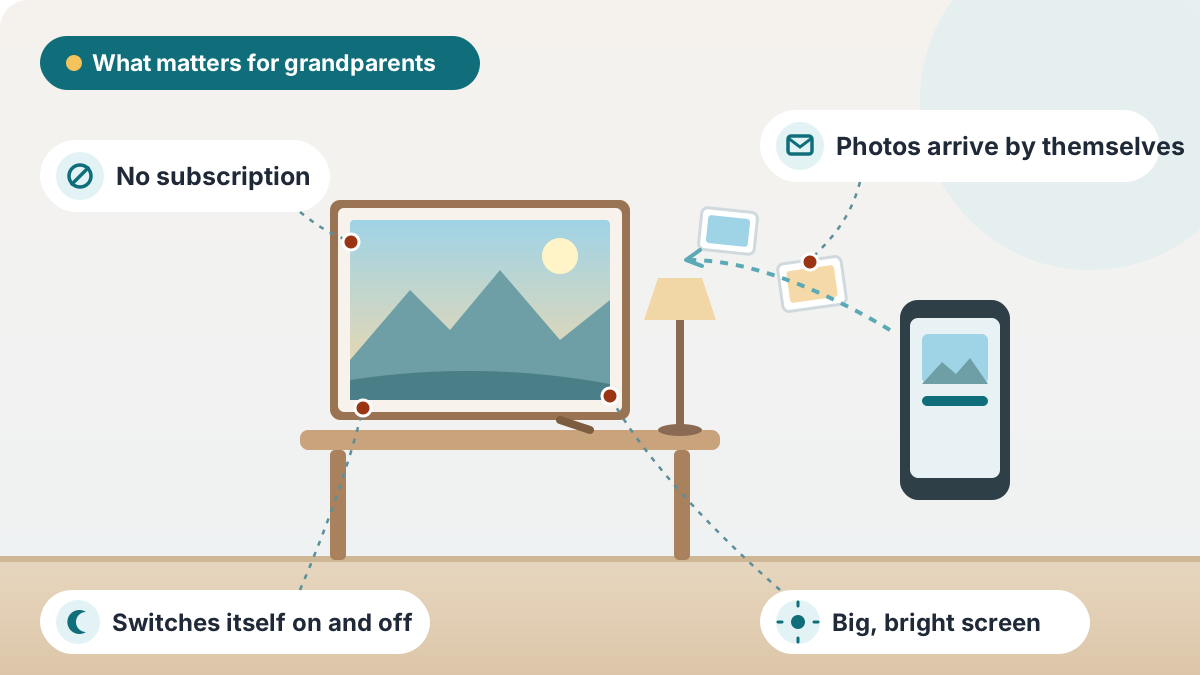
What makes a frame right for a grandparent
- Nothing to do once it is set up. The family sends photos from their phones; the grandparent just enjoys them. All our Wi-Fi picks work this way
- No subscription needed for the features you want. Check what the free plan really includes before you buy (see below)
- A screen that looks after itself: automatic brightness, and an on/off schedule or motion sensor so it is not glowing all night
- A big enough screen: 10 inches suits a side table; 15 inches or more is easier for weaker eyesight or viewing across a room
- Gift preloading, so it shows photos the moment it is plugged in
- A plan for no Wi-Fi: an SD card or USB slot, or a frame made for offline use
Check the subscription before you buy
Most frames are free to use for photos, but the details vary, and they can change after you buy:
- Aura says it charges no subscription and stores unlimited photos and videos free
- Skylight sends photos free, but its Plus plan (about $39 a year) is needed for videos, captions, albums and changing settings from the app
- Loop, Pix-Star and PhotoSpring say no subscription is needed
- Frameo-based frames (like our Pastigio pick) use the free Frameo app
- Nixplay cut its free cloud storage to 500MB, The Verge reported, with paid plans for more; that is why we left Nixplay out despite its popularity
How the family sends photos
- An app (Aura, Skylight, Loop, Frameo): easiest for family members who use smartphones
- Email (Aura, Skylight, Pix-Star): good for relatives who do not want another app
- Text message (Aura, Loop): the simplest of all for most families
- USB stick or SD card (Pix-Star, Pastigio, KECAG): no internet needed, but someone has to update it
Setting it up for them
- Set it up at your home first, or use the maker's gift or preload mode, so it arrives ready
- Ask for the home Wi-Fi name and password in advance and write it down; connecting is the only step that needs it
- Place it where they sit most, at eye level, away from a bright window
- Set a sleep schedule (for example 10 p.m. to 7 a.m.) so it is dark at night
- Invite every family member to send photos, so new ones keep arriving
Read more:Hearing & Vision Support Guide for SeniorsHow Hearing Loss Increases Fall Risk in SeniorsSigns Hearing Loss Is Getting Worse in Seniors
Why a photo frame is such a good gift
Loneliness and social isolation are common in later life and are linked to poorer health. A frame that fills with new photos of grandchildren, pets and everyday family moments is a small, constant connection, especially for a grandparent who lives alone, far away or in care. Many families find it becomes a conversation starter on the phone: "Did you see the photo from the beach?" For staying in touch by voice and video too, see our guide to video-calling devices for the elderly.
What about an Echo Show or other smart display?
Smart displays such as Amazon's Echo Show can show photo slideshows too, and add video calls, reminders and voice control. They are a good choice if the grandparent will use those features, but they are busier than a frame, with more on screen and more settings. For a gift that simply shows family photos with nothing to learn, a dedicated frame is simpler; our Echo Show for seniors guide covers the smart-display route.
In a care home
Check the home's Wi-Fi rules first, and whether the room has a socket free near a table; a frame that can run from a USB stick (our Pix-Star, Pastigio or KECAG picks) is a safe fallback. Label the frame and its power adapter with the resident's name. Our gifts for nursing home residents guide has more ideas that fit care-home rules.
Frequently asked questions
One the grandparent never has to operate: family members send photos from their phones, and the frame shows them with no subscription. Our overall pick is the Aura Carver, with the Skylight Frame 2 for email and the Loop Pro for text messages.
A Wi-Fi frame that the family sets up and fills, so the grandparent does nothing, like the Aura Carver. For homes without Wi-Fi, the KECAG plays photos from a USB stick with no setup at all.
Yes, with any Wi-Fi frame. Family members send photos from their phones by app, email or text, and they appear on the frame wherever it is.
Frames that receive photos from family do. If there is no Wi-Fi, choose one that plays photos from a USB stick or SD card, like the KECAG, Pix-Star LUX or Pastigio Frameo.
Aura, Loop, Pix-Star and PhotoSpring say no subscription is needed, and Frameo frames use a free app. Skylight sends photos free but charges for videos and some features. Nixplay cut its free storage to 500MB.
10 inches suits a side table; 15 inches or more is easier for weaker eyesight or for viewing across a room.
Yes. Aura, Skylight and Nixplay offer gift or preload modes, and Frameo and USB frames can be loaded at your home before you wrap them.
Most do: Loop plays videos of up to 5 minutes, Aura up to 30 seconds, and Frameo up to 15 seconds from the app. Skylight needs its Plus plan for videos.
Usually, if there is a socket and the home allows it. A frame that can run from a USB stick avoids Wi-Fi problems. Label it with the resident's name.
Only if the grandparent will use video calls, reminders and voice control. For simply showing family photos, a dedicated frame is simpler.
The final verdict
For most grandparents, start with the Aura Carver: photos arrive with nothing for them to do, there is no subscription, and the screen looks after its own brightness and sleep. For a family that prefers email, choose the Skylight Frame 2; for sending photos by text, the Loop Pro; for USB, SD and every other way in, the Pix-Star LUX; for a big screen, the Pastigio Frameo 15.6"; and for a home without Wi-Fi, the KECAG. Set it up before you give it, and invite the whole family to send photos.
Our overall winner is the Aura Carver 10" Digital Photo Frame. You can check the current price on Amazon.
Our Top 5 Picks at a Glance
Ready to choose? Here are the top 5 again.
Best Overall
Aura Carver 10" Digital Photo Frame
Best for Emailing Photos
Skylight Frame 2 (10")
Best for Families Who Text
Loop Pro 10.1" Digital Photo Frame
Most Ways to Add Photos
Pix-Star LUX 10.4" Digital Photo Frame
Best Large Screen
Pastigio Frameo 15.6" Digital Photo Frame
Affiliate links — we may earn a commission.
