
Best Kindle for Seniors (and Kindle vs Paperwhite Explained)
 By SK Kutubuddin, Founder & Senior Care Researcher Updated October 2026
In this guide
 Best OverallAmazon Kindle Paperwhite (16GB, 2024)
 Lightest and Best ValueAmazon Kindle (16GB, 2024)
 Best Hands-Off LightingKindle Paperwhite Signature Edition (32GB, 2024)
 Biggest Screen for Low VisionAmazon Kindle Scribe (32GB, newest model)
 Best With Page-Turn ButtonsKobo Libra Colour
 Best Accessory for Reading in BedLamicall Pillow Stand with Adjustable Arm
- What to look for
- Frequently asked questions
For most older readers, the best Kindle is the Kindle Paperwhite: its 7-inch glare-free screen fits more large-print text per page than the basic Kindle, its warm light is easy on the eyes at night, and a charge lasts weeks.
We may earn a commission when you buy through links on this page. Read our affiliate disclosure.
On sale now


Prices from Amazon as of Oct 26, 11:15 PM ET. They can change; the price on Amazon when you buy is the one that applies. Affiliate links — we may earn a commission.
Top 6 Picks — Find Your Situation
#1 · Best Overall
Amazon Kindle Paperwhite (16GB, 2024)Best for: Most older readers, especially in bed or at night
#2 · Lightest and Best Value
Amazon Kindle (16GB, 2024)Best for: A first e-reader, and anyone who wants the lightest one
#3 · Best Hands-Off Lighting
Kindle Paperwhite Signature Edition (32GB, 2024)Best for: Readers who want the screen to look after itself
#4 · Biggest Screen for Low Vision
Amazon Kindle Scribe (32GB, newest model)Best for: Low vision, and readers who want the largest page
#5 · Best With Page-Turn Buttons
Kobo Libra ColourBest for: Stiff fingers, and readers who borrow from the library
#6 · Best Accessory for Reading in Bed
Lamicall Pillow Stand with Adjustable ArmBest for: Hands-free reading in bed or a chair
The basic Kindle is the lightest and best value; the Paperwhite Signature Edition adjusts its own brightness and charges wirelessly; the Kindle Scribe has an 11-inch screen for low vision; the Kobo Libra Colour has real page-turn buttons for stiff fingers and borrows library books directly; and a pillow stand makes reading in bed hands-free. Every current Kindle can make text very large and read books aloud through Bluetooth headphones or a speaker.
A closer look at our top pick
Amazon Kindle Paperwhite (16GB, 2024)
Best for: Most older readers, especially in bed or at night
- Screen
- 7 in glare-free, high contrast
- Light
- Adjustable, white to warm amber
- Battery
- Up to 12 weeks, USB-C
- Waterproof
- Yes
Independently researched · Updated October 2026
The Kindle Paperwhite gets the basics right for an older reader. Its 7-inch glare-free screen is noticeably larger than the basic Kindle's, so at a big font size there is more text and less page turning, and the light can be warmed to amber for comfortable reading in bed.
A single charge lasts up to 12 weeks, so it rarely needs plugging in, and it is waterproof. Like every current Kindle, it has no apps or notifications, the text can be made very large, and books can be read aloud with Assistive Reader through Bluetooth headphones or a speaker.
What we love
- Bigger 7-inch screen than the basic Kindle
- Warm light for night reading
- Up to 12 weeks per charge
- Waterproof; sold by Amazon
Things to consider
- Brightness is set by hand (the Signature Edition does it automatically)
- Page turns are by touch (pair a page-turn remote for stiff hands)
- Check whether the listing says "with ads" on the lock screen
Right for you if
- ✓Reading novels and non-fiction in large print
- ✓Reading in bed at night
- ✓You want something that needs charging only every few weeks
Maybe skip it if
- !You want the lightest device: the basic Kindle
- !Low vision that needs a very large page: the Kindle Scribe
- !You want a product tested hands-on; we research listings and published information, and we say so
Getting started
- →Set a large font and save it as a reading theme
- →Pair Bluetooth headphones for read-aloud
- →Turn on warm light for evening reading
- →Link it to the library through Libby
How it compares
Our #2 pick, the basic Kindle, is lighter and cheaper but has a smaller 6-inch screen, no warm light and about half the battery life. Choose the Paperwhite for comfort, the Kindle for the lightest and least expensive option.
How we picked
We compared 16 options. We considered 105 e-readers and reading accessories from Amazon searches covering every current Kindle model, Kobo e-readers, page-turn remotes, bed and pillow stands and hand-strap cases, plus one shortlisted from the Amazon Deals Hub. We judged them on what matters for older readers: how large the text can be made and how much fits on a page, glare-free screens and warm light, read-aloud and other accessibility features, weight, battery life, and how easy it is to turn pages with stiff fingers. Product details come from each product's Amazon listing, pulled through Amazon's product API on 27 October 2026, with Kobo's own product page and Amazon's accessibility announcements checked where the listing was thin. We did not test these devices hands-on.
Reviewed by SK Kutubuddin — who researches senior-care products and the real-world needs of caregivers and older adults.
Other picks, reviewed
Amazon Kindle (16GB, 2024)
The lightest Kindle at 0.35 lb (about 158 g), easy to hold for long spells with weak or arthritic hands. Its 6-inch glare-free screen has a front light that Amazon says is 25% brighter at its maximum than before, plus dark mode (white text on black), which some people with low vision find easier. A charge lasts up to 6 weeks and 16GB holds thousands of books. It does everything the Paperwhite does for reading, on a slightly smaller screen.
What we like
- The lightest Kindle
- Brighter front light and dark mode
- Same large-text and read-aloud features
- Sold by Amazon
Keep in mind
- Smaller screen: fewer words per page at big font sizes
- No warm light
- Waterproofing is not listed
- Screen
- 6 in glare-free, high contrast
- Light
- Adjustable front light, dark mode
- Battery
- Up to 6 weeks
- Waterproof
- Not listed
- Weight
- 0.35 lb (about 158 g)
Kindle Paperwhite Signature Edition (32GB, 2024)
The same 7-inch Paperwhite, with two upgrades that suit a reader who does not want to fiddle with settings: the front light adjusts itself to the room, so the page is never too bright in bed or too dim by the window, and it can charge wirelessly by being set down on a dock (sold separately), so there is no small USB-C port to find. It also has 32GB of storage and is waterproof. A thinner aluminium Signature Edition with a replaceable battery and no ads is on pre-order as we write.
What we like
- Brightness adjusts itself
- Wireless charging on a dock (no cable to plug in)
- 32GB storage
- Waterproof; sold by Amazon
Keep in mind
- The charging dock is sold separately
- Costs more than the standard Paperwhite
- A newer version is on pre-order: check which you are buying
- Screen
- 7 in glare-free
- Light
- Auto-adjusting, warm light
- Battery
- Up to 12 weeks; wireless charging
- Storage
- 32GB
- Waterproof
- Yes
Amazon Kindle Scribe (32GB, newest model)
For macular degeneration or other low vision, page size matters: the Scribe's 11-inch glare-free screen has about three times the area of the 6-inch Kindle, so far more large-print text fits on each page and there is less page turning at very big font sizes. Its light adjusts its brightness automatically and its warmth can be set for night reading. At 400 g it is light for its size, though heavier than the smaller Kindles, so it is best read on a lap, a cushion or a stand. It comes with a pen that never needs charging, for notes or marking passages.
What we like
- Largest Kindle screen by far
- Auto-adjusting light
- Pen included, never needs charging
- Sold by Amazon
Keep in mind
- Heavier: use a stand or cushion
- Much more expensive
- Note-taking and AI tools are more than most readers need
- Screen
- 11 in glare-free
- Light
- Auto-adjusting, adjustable warmth
- Battery
- Weeks per charge
- Extras
- Pen included; notebooks and documents
- Weight
- 400 g (0.88 lb)
Kobo Libra Colour
The one e-reader here with physical page-turn buttons on the side, which many people with arthritis, tremor or numb fingertips find easier than tapping a touchscreen. Kobo also builds in OverDrive and Libby, so free library e-books can be borrowed on the device itself, where library service is available. It has a 7-inch glare-free colour E Ink screen with dark mode, full font-size control, Bluetooth for Kobo audiobooks, IPX8 waterproofing, and weighs about 199.5 g. Kobo gives a 1-year limited warranty.
What we like
- Real page-turn buttons
- Library borrowing on the device
- Waterproof (IPX8)
- Bluetooth audiobooks
Keep in mind
- Does not read Kindle Store books
- Sold by Kobo, not Amazon
- Colour adds little for plain novels
- Screen
- 7 in colour E Ink, glare-free
- Light
- Adjustable, dark mode
- Battery
- Not stated in the listing
- Buttons
- Physical page-turn buttons
- Library
- OverDrive and Libby built in
Lamicall Pillow Stand with Adjustable Arm
Holding any e-reader up for an hour tires the wrists, especially with arthritis. This soft, U-shaped lap pillow has an adjustable arm and a clamp that rotates through 360 degrees, so a Kindle can be held at eye level, hands-free, in bed or on the sofa. The cover is machine washable, pockets keep glasses and a phone or remote to hand, and it fits devices from 4.7 to 13 inches. Lamicall gives a 1-year warranty.
What we like
- Hands-free at any angle
- Soft lap pillow
- Washable cover, handy pockets
- 1-year warranty
Keep in mind
- Bulky to store
- Snack bowls are a gimmick
- Sold by Lamicall, not Amazon
- Screen
- Fits 4.7 to 13 in devices
- Light
- n/a (accessory)
- Battery
- n/a (accessory)
- Adjustment
- Adjustable arm, 360-degree clamp
- Cleaning
- Machine-washable cover
What to look for
Kindle vs Kindle Paperwhite: which should you buy?
They read the same books with the same accessibility features. The differences that matter for an older reader:
- Screen: the Paperwhite's 7-inch screen fits more words on each page than the Kindle's 6-inch screen, which matters at the large font sizes many older readers use
- Light: the Paperwhite's light shifts from white to warm amber, which is more comfortable in bed at night; the Kindle has a brighter white light and dark mode
- Battery: up to 12 weeks for the Paperwhite, up to 6 weeks for the Kindle
- Waterproofing: listed for the Paperwhite, not for the Kindle
- Weight: the Kindle is lighter, about 158 g against 213 g
In short: choose the Paperwhite for comfort and a bigger page, the Kindle for the lightest device and the lowest price, and the Paperwhite Signature Edition if you want the brightness to look after itself.
Features that help older readers
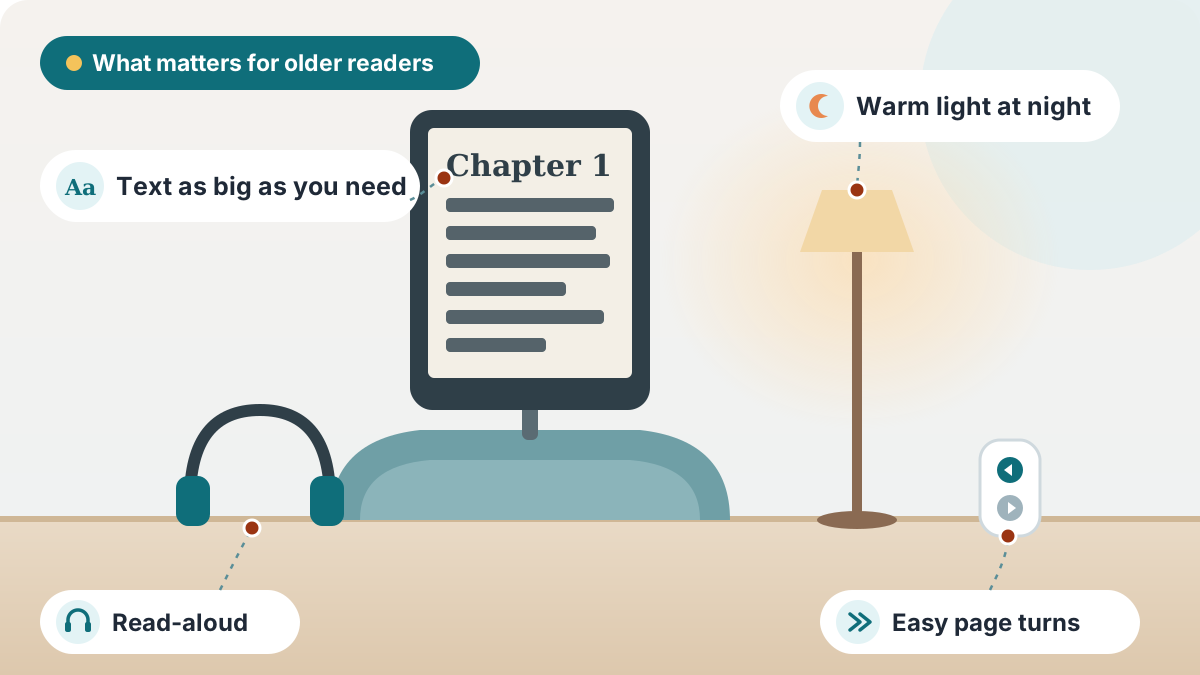
- Large text: every Kindle lets you choose the font size, typeface, line spacing and margins, so even small-print books can be read in very large type. Amazon says current-generation Kindles can also enlarge the menu text
- Read aloud: Amazon's Assistive Reader reads books aloud with the words highlighted, and VoiceView is a full screen reader for blind and low-vision users. Kindles have no speaker, so you need Bluetooth headphones or a Bluetooth speaker
- Dark mode: white text on a black page, which some people with cataracts or macular degeneration find easier
- Word Wise: short definitions above harder words in many English books
- Glare-free screens: E Ink reflects light like paper, so there is no glare and it is comfortable for long reading
Easier page turning
Tapping or swiping can be hard with arthritis, tremor or numb fingertips. Options:
- An e-reader with buttons: the Kobo Libra Colour has physical page-turn buttons
- A page-turn remote: Amazon's own Kindle Click remote has large forward and back buttons, brightness buttons and a wrist strap, and works with Kindles released in 2024 and later; it is on pre-order as we write, and other Bluetooth page turners are available now
- A case with a hand strap, so the Kindle can be held one-handed without gripping
- A stand or pillow holder (our Lamicall pick) for hands-free reading
Free books: libraries and Kindle+
- Your public library: in the U.S., many libraries lend Kindle books through the free Libby app, which sends them to the Kindle; Kobo e-readers borrow directly on the device
- Amazon's subscription: the current Kindle listings describe an optional Kindle+ subscription for unlimited reading of millions of titles; check the price and the catalogue before signing up
- Free classics: many older books are free in the Kindle Store
Read more:Hearing & Vision Support Guide for SeniorsHow Hearing Loss Increases Fall Risk in SeniorsSigns Hearing Loss Is Getting Worse in Seniors
Setting up a Kindle for a parent
- Set it up on your own Wi-Fi first, or connect it at their home, and register it to an Amazon account they or you manage
- Make the font size large and save it as a theme, so it stays that way
- Turn off the lock-screen ads if the model has them, and turn on dark mode or warm light if they prefer
- Pair Bluetooth headphones or a speaker if they want books read aloud
- Load a few books they will enjoy, and show them how to go back to the library page
- Write down how to charge it, and how often (every few weeks)
Is a Kindle better than a tablet for seniors?
For reading, usually yes. An E Ink screen has no glare and reflects light like paper, the battery lasts weeks rather than a day, and there are no notifications, apps or social media to get lost in. A tablet is better for video calls, photos and apps; see our tablets for elderly with poor vision guide for that.
Frequently asked questions
The Kindle Paperwhite for most: a 7-inch glare-free screen, warm light and weeks of battery. The basic Kindle is lightest and cheapest, and the Kindle Scribe's 11-inch screen suits low vision.
The Paperwhite has a larger 7-inch screen, warm amber light, up to 12 weeks of battery and waterproofing. The Kindle has a 6-inch screen, up to 6 weeks of battery and is lighter and cheaper.
Yes. Assistive Reader reads books aloud with highlighting on current-generation Kindles, and VoiceView is a screen reader. Kindles have no speaker, so use Bluetooth headphones or a Bluetooth speaker.
Open a book, tap the top of the screen, choose the Aa (display settings) menu and increase the font size. You can save the setting as a theme so it stays.
Often, because text can be made very large and dark mode helps some people. A larger screen, such as the 11-inch Kindle Scribe, keeps more large text on each page. Read-aloud is there for days when reading is tiring.
Current Kindles turn pages by touch. The Kobo Libra Colour has physical page-turn buttons, and Bluetooth page-turn remotes, including Amazon's Kindle Click, add buttons to a Kindle.
In the U.S., many public libraries lend Kindle books through the free Libby app. Kobo e-readers borrow library books directly on the device.
For reading, yes: no glare, weeks of battery, and no apps or notifications. A tablet is better for video calls and apps.
Some models are sold with ads on the lock screen. Check whether the listing says "with ads"; the newest Paperwhite Signature Edition and Colorsoft are listed with no ads.
Use warm light at a low brightness, and a pillow stand or adjustable holder so you do not have to hold it up. A page-turn remote saves reaching for the screen.
The final verdict
For most older readers, start with the Kindle Paperwhite: a 7-inch glare-free screen, warm light and weeks of battery. For the lightest device, choose the basic Kindle; for brightness that adjusts itself and wireless charging, the Paperwhite Signature Edition; for low vision, the 11-inch Kindle Scribe; for stiff fingers and library books, the Kobo Libra Colour; and for reading in bed, add the Lamicall pillow stand. Set the text large, pair headphones for read-aloud, and connect it to their library.
Our overall winner is the Amazon Kindle Paperwhite (16GB, 2024). You can check the current price on Amazon.
Our Top 5 Picks at a Glance
Ready to choose? Here are the top 5 again.
Best Overall
Amazon Kindle Paperwhite (16GB, 2024)
Lightest and Best Value
Amazon Kindle (16GB, 2024)
Best Hands-Off Lighting
Kindle Paperwhite Signature Edition (32GB, 2024)
Biggest Screen for Low Vision
Amazon Kindle Scribe (32GB, newest model)
Best With Page-Turn Buttons
Kobo Libra Colour
Affiliate links — we may earn a commission.
More reviews
