
5 Best Health Wearables for Seniors
 By Kutubuddin, Founder & Senior Care Researcher Updated October 2026
In this guide

There is no single best wearable here — the right one depends on what you are watching for. Fall detection and ECG in a device you can also call and navigate with points to a smartwatch.
We may earn a commission when you buy through links on this page. Read our affiliate disclosure.
Top 5 Picks — Find Your Situation
#1 · Best overall
Apple Watch Series 12 (GPS + Cellular, 46mm)Best for: iPhone users who want the most complete fall detection, safety, and health monitoring
#2 · Best discreet
Oura Ring 4Best for: Discreet 24/7 sleep and health monitoring without a screen or daily charging
#3 · Best battery life
Garmin Venu 4 (41mm)Best for: Seniors who want 5+ day battery life without daily charging
#4 · Best value tracker
Fitbit Charge 6Best for: Affordable everyday health tracking with familiar Fitbit brand and 7-day battery
#5 · Best for active seniors
Whoop 5.0 / MGBest for: Active seniors who want in-depth recovery, strain, and sleep optimisation data
Continuous monitoring you never have to think about points to a ring. Multi-day battery life without daily charging, or serious training and recovery data, point to different picks again. If the real goal is safety rather than fitness — falls and inactivity, not steps — a dedicated elderly monitoring system fits better than any fitness wearable. Below, our picks by what you are actually trying to catch.
A closer look at our top pick
Apple Watch Series 12 (GPS + Cellular, 46mm)
Best for: iPhone users who want the most complete fall detection, safety, and health monitoring
- Fall detection
- Yes (emergency alert)
- ECG
- Yes (AFib detection)
- Battery
- All-day (charge nightly)
Independently researched · Updated October 2026
Apple Watch Series 12 earns the top position for seniors because fall detection + Emergency SOS in a single device is the safety combination that matters most for older adults, particularly those living alone. Fall detection and the Emergency SOS button give seniors a way to call for help when they cannot reach a phone.
Beyond safety, the health monitoring is genuinely comprehensive: ECG for AFib detection, blood oxygen, sleep, medication reminders, and integration with Apple Health that connects to many healthcare providers’ patient portals.
What we love
- Fall detection + Emergency SOS + ECG + blood oxygen in one device
- Slim, light design that is comfortable for all-day wear
- Medication reminders; intuitive for iPhone users
- Health data integrates with Apple Health and healthcare providers
Things to consider
- Daily charging required (about a day of battery)
- Requires iPhone to set up and use most features
- Most expensive pick on this list
Right for you if
- ✓iPhone users who prioritise fall detection and emergency safety features
- ✓Seniors managing cardiovascular health who want ECG and heart rhythm monitoring
- ✓Daily charging is manageable as part of a nightly routine
Maybe skip it if
- !Android users (Apple Watch requires iPhone)
- !Seniors who will not charge daily (Garmin Venu 4 or Oura Ring 4)
- !Sedentary seniors who want passive monitoring without daily interaction (Oura Ring)
What owners consistently report
Common praise
- +Family members of seniors report significant peace of mind from the fall detection feature
- +ECG readings can prompt a conversation with a doctor about irregular rhythms
- +Medication reminders are specifically noted as a valuable daily benefit
Common gripes
- –Daily charging is the most common reason seniors stop wearing it — build charging into a nightly routine
- –Initial iPhone setup requires some technical comfort; ask a family member to help the first time
- –Fall detection may trigger accidentally during vigorous movements; can be calibrated in settings
Getting started
- →Set up fall detection and emergency contacts on first configuration — this is the most important step
- →Enable medication reminders in the Health app for any regular prescriptions
- →Charge nightly on the bedside table alongside the phone
How it compares
For seniors who need more than about a day of battery and do not need fall detection, the Garmin Venu 4 provides up to 10 days of tracking on a single charge with a large, readable screen. Choose Apple Watch for fall detection and iPhone integration; choose Garmin for longer battery and Android compatibility.
How we picked
We compared 5 options. Our picks are based on published specifications, independent reviews, and health monitoring guidance — not clinical testing. We focused on features most relevant to senior health monitoring: fall detection, heart rate and rhythm (AFib detection), blood oxygen, emergency SOS, medication reminders, sleep tracking, and ease of daily use (charging frequency, app complexity). Health wearables are monitoring tools, not medical devices — any concerning reading should prompt a consultation with a healthcare provider, not a self-diagnosis.
Reviewed by Kutubuddin — who researches senior-care products and the real-world needs of caregivers and older adults.
Other picks, reviewed
Oura Ring 4

The Oura Ring 4 is a titanium ring worn on a finger that tracks sleep, heart rate, heart rate variability, blood oxygen, body temperature, and activity continuously. There is no screen, no notifications, and nothing to configure daily — wear it and check the app in the morning. Battery lasts 5–8 days. For seniors who want continuous health monitoring without the bulk or daily charging of a smartwatch, and who find screen-based devices overwhelming, the Oura Ring 4 is the most discreet and effortless option. Requires a smartphone app and a monthly subscription. Does not have fall detection or emergency features.
What we like
- Invisible to others; nothing to configure or interact with daily
- 5–8 day battery; titanium construction
- Best-in-class sleep tracking and readiness score
- Passive data collection requires no effort beyond wearing
Keep in mind
- No fall detection or emergency features
- Requires monthly subscription for full data access
- Requires smartphone app for data review
- Form
- Titanium ring (no screen)
- Battery
- 5–8 days
- Subscription
- Required
Garmin Venu 4 (41mm)
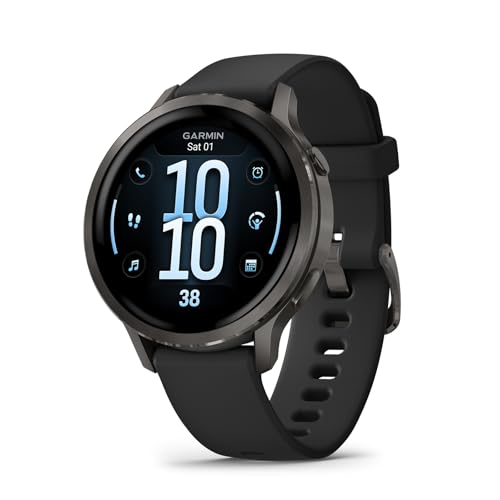
The most common reason seniors abandon a smartwatch is the daily charging requirement. The Garmin Venu 4 solves this with up to 10 days of battery life in a full-featured smartwatch — meaningful daily health monitoring without the daily charging ritual. It tracks heart rate, sleep, blood oxygen, stress, and body battery (Garmin’s energy level score), and adds a built-in flashlight that is genuinely useful for night trips to the bathroom. The face is large and readable, the UI is more straightforward than many health apps, and it works with both iPhone and Android. Does not have the fall detection or ECG of the Apple Watch, but the battery life difference is significant for seniors who forget to charge daily.
What we like
- Up to 10-day battery — no daily charging required
- Works with both iPhone and Android
- Large readable screen; intuitive health dashboard
- Comprehensive health metrics without subscription
Keep in mind
- No fall detection or ECG (choose Apple Watch for those)
- No cellular (must have phone nearby for emergency SOS)
- More expensive than Fitbit at a similar use case
- Battery
- 5–8 days
- Platform
- iPhone and Android
- Screen
- Large, readable AMOLED
Fitbit Charge 6

The Fitbit Charge 6 is the most accessible health tracker for seniors who want reliable heart rate monitoring, sleep tracking, step counting, and a familiar brand at a lower price than a full smartwatch. Battery lasts 7 days, the slim band is comfortable for all-day wear, and the Google Health integration provides clean data presentation. ECG app for AFib detection is included (though requires the Google Fitbit app). Works with both iPhone and Android. For seniors who want health tracking without the cost and complexity of a full smartwatch, this is the practical starting point.
What we like
- 7-day battery; slim, comfortable band
- ECG for AFib detection; continuous heart rate
- Works with iPhone and Android
- Lower price than full smartwatches; Fitbit brand recognition
Keep in mind
- Smaller screen than a smartwatch; less readable for some seniors
- No fall detection; limited smartwatch features
- Requires Google Account for Fitbit Premium features
- Battery
- 7 days
- ECG
- Yes (AFib detection)
- Price
- Significantly less than Apple Watch or Garmin
Whoop 5.0 / MG

Whoop 5.0 is the most comprehensive physiological monitoring device on this list, tracking recovery, strain, sleep stages, heart rate variability, respiratory rate, blood oxygen, and skin temperature continuously. The new Healthspan feature tracks biological age markers. Up to 14-day battery; no screen (data reviewed via app). The subscription-based model means the device itself is included. However, Whoop is designed for people who want to optimise training and recovery — it is best suited to active seniors managing fitness, rather than sedentary seniors monitoring general health. For most non-athletic seniors, the Garmin Venu 4 or Apple Watch provides more useful daily features.
What we like
- Extensive physiological tracking
- Up to 14-day battery; can charge while wearing
- New Healthspan biological age tracking
- No screen — fully passive monitoring
Keep in mind
- Subscription required — ongoing cost
- No fall detection, emergency features, or notifications
- Best for active seniors — less relevant for sedentary monitoring
- Data is app-only — no on-device readout
- Battery
- Up to 14 days
- Screen
- None (app-only data)
- Model
- Whoop 5.0 (updated from 4.0)
What to look for
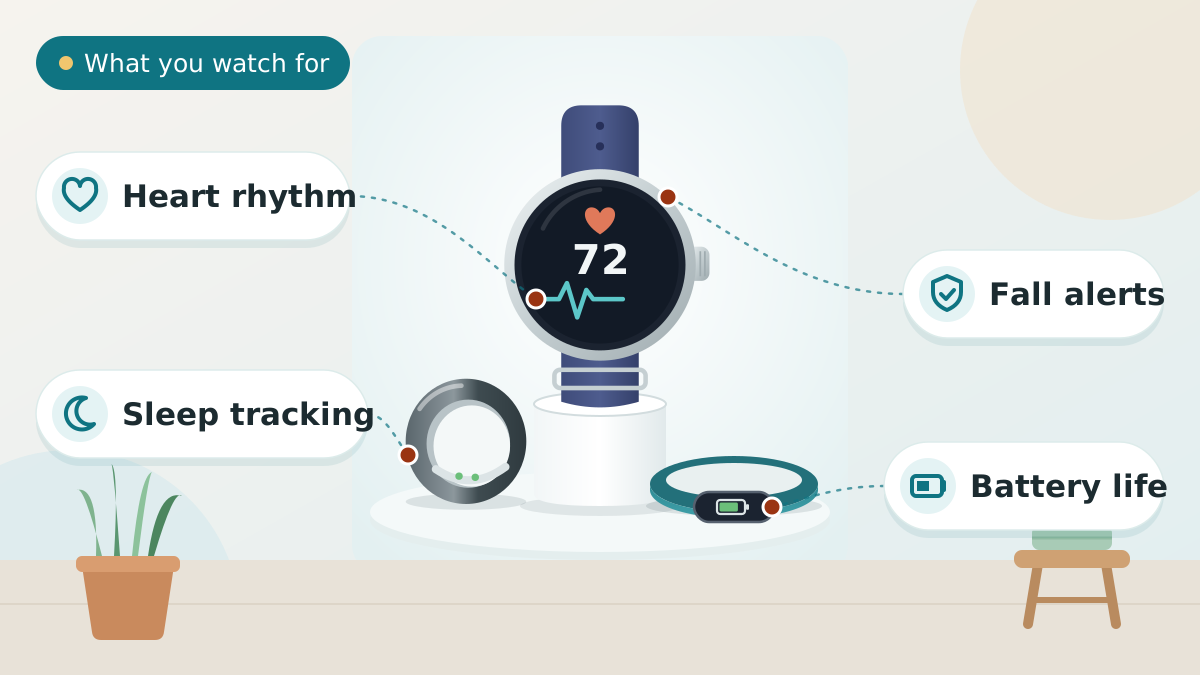
Fall detection is a senior-specific priority
For seniors living alone or at fall risk, fall detection is the most safety-critical feature a wearable can have. Apple Watch Series 12 and Apple Watch Ultra 4 are currently the best-available fall detection options: when a hard fall is detected and the user does not respond within 60 seconds, the watch calls emergency services and alerts contacts automatically. No other mainstream wearable provides this level of automatic fall response.
For seniors who want fall detection, the choice is effectively Apple Watch (which requires an iPhone). All other wearables on this list do not have fall detection.
Battery life versus features
The Apple Watch’s roughly one-day battery means daily charging. For seniors who already charge their phone every night, adding the watch to that routine is manageable. For seniors who are unlikely to charge consistently, a long-battery device (Garmin Venu 4 up to 10 days, Oura Ring 4 ~5–8 days) or 7-day battery (Fitbit Charge 6) is more practical, because a wearable not being worn is useless. Trade-off: longer battery life typically means fewer real-time smart features (no fall detection, no cellular).
Smartphone compatibility
Apple Watch requires an iPhone to set up and use most health features. All other devices on this list (Oura Ring 4, Garmin Venu 4, Fitbit Charge 6, Whoop 5.0) work with both iPhone and Android. If the senior uses an Android phone, the Apple Watch is not an option.
Health wearables are monitoring tools, not diagnostic devices
ECG apps on wearables can detect irregular heart rhythm (AFib) but they are not replacements for a clinical ECG. Blood oxygen readings are indicative, not clinical-grade. Fall detection works for significant falls but does not detect all falls. Any concerning reading from a wearable should prompt a conversation with a healthcare provider, not a self-diagnosis or medication change.
Read more:The 2026 Guide to AI Technology for SeniorsDementia Daily Routine for CaregiversPreventing Hospital Readmission in Seniors
Tips to Choose Health Wearables
Short on time? Here are the key points to weigh before choosing, each covered in detail above:
- Fall detection is a senior-specific priority
- Battery life versus features
- Smartphone compatibility
- Health wearables are monitoring tools, not diagnostic devices
Comparing options? See our guides to Best Medical Alert Devices for Seniors, Best Ai Ambient Fall Detection Sensors, and Best Bed Alarms for Elderly.
Sharing health data with family and caregivers
Apple Watch health data can be shared with family members via Apple Health sharing, allowing a daughter or son to receive notifications if an unusual heart rate or fall is detected. Garmin Connect has a similar tracking sharing feature. This remote monitoring capability is particularly valuable for seniors living alone — it provides a layer of safety oversight without the senior needing to do anything beyond wearing the device.
Discuss data sharing openly with the senior before enabling it — some people find monitoring by family members intrusive, and autonomy and privacy are important.
Frequently asked questions
For iPhone users who want fall detection and emergency features: Apple Watch Series 12. For discreet 24/7 sleep and health monitoring without daily charging: Oura Ring 4. For Android users or those who want 5+ day battery: Garmin Venu 4. For a familiar brand at a lower price: Fitbit Charge 6. For active seniors focused on recovery: Whoop 5.0.
Apple Watch Series 12 (and other current Apple Watch models) has fall detection that automatically calls emergency services and alerts contacts if a hard fall is detected and the user does not respond within 60 seconds. No mainstream Android smartwatch currently offers this level of automatic fall detection and emergency response.
Apple Watch requires daily charging (about a day). Fitbit Charge 6 lasts 7 days. Garmin Venu 4 lasts up to 10 days. Oura Ring 4 lasts 5–8 days. Whoop 5.0 lasts up to 14 days and can be charged while wearing. For seniors who are unlikely to charge consistently, a longer-battery device is more practical.
No mainstream smartwatch can detect a heart attack. They can detect irregular heart rhythm (AFib) through ECG apps (Apple Watch, Fitbit Charge 6), and can alert to high or low heart rate, which may be relevant in a cardiac event. But these are monitoring signals, not diagnostic tools. Any cardiac symptoms require emergency medical care regardless of what the wearable shows.
The Oura Ring 4 is a titanium ring that tracks sleep, heart rate, HRV, blood oxygen, body temperature, and activity without a screen or notifications. It is ideal for seniors who want passive, continuous monitoring without the daily charging, screen complexity, or social visibility of a smartwatch. It requires a monthly subscription and does not have fall detection or emergency features.
Whoop 4.0 has been replaced by the Whoop 5.0 (and the premium Whoop MG). The 5.0 is smaller and thinner, is more power-efficient, extends battery life to 14 days, and introduces Healthspan tracking and Blood Pressure Insights. The subscription model includes the device. If purchasing new, buy the Whoop 5.0, not the older 4.0.
Oura Ring 4, Garmin Venu 4, Fitbit Charge 6, and Whoop 5.0 all work with Android smartphones. Apple Watch requires an iPhone and does not pair with Android. If the senior uses an Android phone, Apple Watch is not an option.
Health wearables (smartwatches, fitness trackers) are not covered by Original Medicare as standard consumer electronics. Some Medicare Advantage plans may offer allowances for fitness and wellness equipment, but this varies widely by plan. Confirm with the specific plan for any coverage.
Yes. Apple Health can be shared with healthcare providers through the Health Records feature at supported hospitals and clinics. Apple Watch ECG data can be exported as a PDF to share with a cardiologist. Fitbit, Garmin, and Oura also have export options for health data. Ask the healthcare provider which format they accept.
The most clinically relevant metrics for seniors are: resting heart rate (changes can indicate cardiovascular or health issues), heart rhythm (AFib detection via ECG), blood oxygen (low readings can indicate respiratory or cardiac issues), sleep duration and quality, and step/activity counts as a daily mobility indicator. All five picks on this list track these core metrics in different combinations.
The final verdict
For seniors with an iPhone who want fall detection and the most complete health monitoring: Apple Watch Series 12 is the clear choice. For discreet 24/7 monitoring without a screen: Oura Ring 4. For Android users or those who want the longest battery: Garmin Venu 4 (up to 10 days). For a familiar brand at lower cost: Fitbit Charge 6. For active seniors focused on recovery and training optimisation: Whoop 5.0. The most important factor is whether the device will be worn consistently — a simple, comfortable device that is always on delivers more value than a feature-rich device that sits on the bedside table uncharged.
Our overall winner is the Apple Watch Series 12 (GPS + Cellular, 46mm). You can check the current price on Amazon.
Our Top 5 Picks at a Glance
Ready to choose? Here are the top 5 again.
Best overall
Apple Watch Series 12 (GPS + Cellular, 46mm)
Best discreet
Oura Ring 4
Best battery life
Garmin Venu 4 (41mm)
Best value tracker
Fitbit Charge 6
Best for active seniors
Whoop 5.0 / MG
Affiliate links — we may earn a commission.
